iOS App Development Services
for Apps Built to Last
Build secure, scalable iPhone and iPad applications with an iOS app development company
in India that takes your product from the first build to every stage that follows.
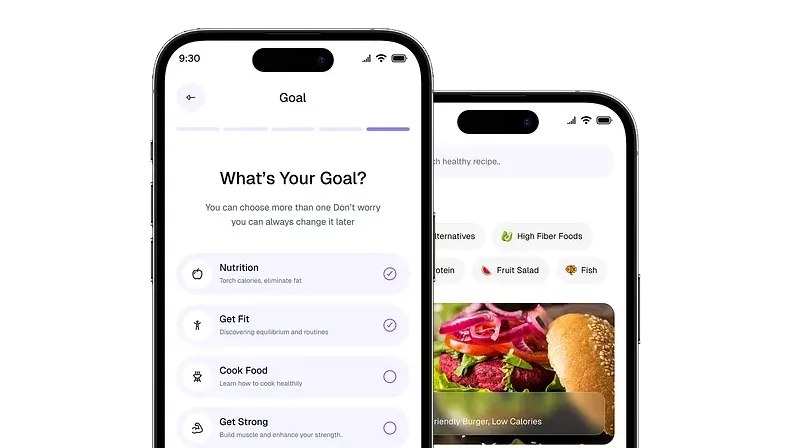
iOS App Development Services for Business-Critical Apps
From product discovery to App Store launch and ongoing maintenance,
get the iOS capabilities your app needs to move forward.

1
iOS Product Discovery
Turn an idea or business requirement into a defined product roadmap covering user flows, core features, technical requirements, and the scope needed for an iPhone or iPad application.

2
iOS UI/UX Design
Design interfaces around Apple's Human Interface Guidelines, including familiar navigation patterns, touch interactions, Dynamic Type, and layouts that work across supported iPhone and iPad screen sizes.

3
Custom iOS App Development
Get custom iOS app development services built around your product requirements, with the architecture, APIs, data flows, and Apple platform capabilities needed to support the way your app is expected to work.

4
iOS Integration & Backend Development
Connect your iOS app with the APIs, backend systems, payment platforms, cloud services, and Apple capabilities it needs to work as intended. This can include Apple Pay, CloudKit, Sign in with Apple, HealthKit, and other third-party or enterprise integrations.

5
iOS Testing & App Store Launch
Validate each release through real-device testing, TestFlight beta distribution, regression testing, and App Store readiness checks before preparing the build for Apple's review process.

1
Legacy iOS App Assessment
Review the existing codebase, architecture, dependencies, performance, and deprecated APIs to identify what should be retained, refactored, replaced, or migrated before modernization begins.

2
iOS App Migration & Reengineering
Move legacy applications to a modern iOS architecture, including the transition from outdated frameworks or Objective-C code where appropriate, while protecting existing functionality and user data.

3
Architecture & Code Refactoring
Restructure difficult-to-maintain code, reduce technical debt, update dependencies, and improve the application's foundation, so new features do not become increasingly expensive to build.

4
iOS UI/UX Modernization
Update outdated interfaces using current Apple design patterns and Human Interface Guidelines, while improving accessibility through mechanisms such as VoiceOver labels, Dynamic Type, and clearer interaction states.

5
Performance & Compatibility Optimization
Use tools such as Xcode Instruments to identify memory, CPU, energy, and responsiveness issues while updating the application for current iOS versions, devices, and supported APIs.

1
Bug Fixes & Quality Assurance
Investigate reported issues, reproduce them across relevant iOS versions and devices, and run regression tests before release to confirm that a fix has not created problems elsewhere.

2
App Store Compliance Updates
Review changes against relevant App Store Review Guidelines, including privacy disclosures, account deletion requirements, in-app purchase rules, and submission metadata before an updated build is submitted.

3
iOS Version & Device Updates
Prepare the application for new iOS releases, device capabilities, and API changes through compatibility testing, dependency updates, and targeted code changes.

4
Accessibility Improvements
Review the app against Apple's accessibility guidance and relevant WCAG considerations, improving VoiceOver support, Dynamic Type, contrast, accessible labels, and keyboard or assistive navigation where required.

5
Application Support & Monitoring
Monitor crashes and production issues using tools such as Crashlytics or similar reporting systems, investigate recurring problems, and support planned releases, fixes, and ongoing application changes.
iOS App Features for Every Industry
Explore industry-specific features built around your users, workflows, and business needs.
Apple Pay Integration
Enable faster, more secure payments with Apple Pay and PassKit, allowing users to authenticate purchases with Face ID or Touch ID instead of repeatedly entering card details.

Apple Wallet Features
Use PassKit to add eligible payment cards, tickets, loyalty passes, or other digital credentials to Apple Wallet for easier access when users need them.

Biometric Authentication
Use the LocalAuthentication framework to enable Face ID and Touch ID for secure sign-in, account access, and transaction verification on supported Apple devices.

Personalized Financial Insights
Apply Core ML to analyze available transaction and user data, helping deliver more relevant spending insights, recommendations, and financial experiences.

HealthKit Integration
Connect with HealthKit to securely read and share permitted health and fitness data, creating a more connected experience across compatible Apple devices.

Apple Watch Experiences
Extend relevant app features to Apple Watch, giving users quicker access to workouts, activity updates, reminders, and other information without reaching for their iPhone.

Activity and Workout Tracking
Use HealthKit and Core Motion to support workout tracking, movement-based features, and activity insights built around the data users choose to share.

Personalized Health Insights
Use Core ML to identify relevant patterns in available health and fitness data, supporting more personalized recommendations, progress tracking, and user experiences.

AR Product Try-Ons
Use ARKit to let customers visualize products in their surroundings or try compatible items virtually, helping them make more informed purchase decisions.

Apple Pay Checkout
Reduce checkout friction with Apple Pay, allowing users to complete eligible purchases through a familiar payment flow authenticated with Face ID or Touch ID.

Personalized Shopping
Apply Core ML to support more relevant product recommendations based on available user preferences, browsing behavior, and interactions within the app.

Visual Product Discovery
Use Vision and Core ML to support image-based search, object recognition, and other visual discovery features that make finding products easier.

CarPlay Integration
Extend eligible navigation and transportation features to Apple CarPlay, giving users access to relevant app functionality through supported in-vehicle displays.

Location and Route Services
Use Core Location and MapKit to support live location tracking, route visualization, nearby services, and other experiences built around where users are.

Trip Status Notifications
Use Apple Push Notification service to deliver timely updates about driver arrivals, trip changes, delays, or other events that require the user's attention.

Smarter Route Experiences
Apply Core ML alongside location data to support more relevant route suggestions, demand forecasting, and personalized transportation experiences where the use case requires it.

Interactive AR Learning
Use ARKit to turn lessons into interactive experiences, helping learners explore objects, environments, and concepts beyond static text, images, or video.

Personalized Learning Paths
Apply Core ML to learner activity and progress data to support more relevant content recommendations and next-step suggestions.

On-Device Intelligence
Use Core ML to power supported intelligent features directly on the device, reducing reliance on constant server communication for applicable learning experiences.

Offline Learning Access
Enable learners to access downloaded lessons, resources, and relevant progress information when connectivity is limited, with data synchronized when they reconnect.

Location-Aware Experiences
Use Core Location and MapKit to help users discover nearby properties, attractions, restaurants, and services while navigating relevant destinations.

Apple Wallet Passes
Use PassKit to support eligible boarding passes, tickets, reservations, and loyalty experiences that users can access directly through Apple Wallet.

AR Destination Experiences
Use ARKit to create interactive property, venue, or destination previews that help users explore spaces before or during their visit.

Personalized Travel Recommendations
Apply Core ML to available user preferences and interactions to support more relevant recommendations for destinations, stays, activities, and experiences.

Build Smarter iOS App Experiences
Add AI capabilities that help automate work, personalize interactions, and deliver more useful experiences.
-
AI Agents
Move beyond assistants. Build AI agents that can understand context, plan next steps, and complete multi-step tasks inside your app using on-device intelligence where applicable to keep relevant interactions fast and responsive.

-
AI Voice
Sometimes the fastest tap is no tap at all. Let users speak naturally to search, complete actions, and control your app through conversational voice experiences, with speech and on-device processing integrated where relevant.
-
AI Chatbots
Your app doesn't just answer questions – it gets things done. Build AI chat experiences that understand user intent, guide users through tasks, retrieve relevant information, and turn conversations into useful actions.
-
AI Search & Discovery
Help users find what they need without endless scrolling. Combine intelligent search, recommendations, and Core ML-powered personalization to understand intent, surface relevant results, and improve every interaction over time.
-
AI Workflow Automation
Turn repetitive taps into intelligent workflows. Automate approvals, updates, reminders, and routine actions, allowing AI agents and connected systems to handle the work happening behind the scenes.


Powered By the Right Stack
The right technology for what your app needs today – and where it needs to go next.
Languages
Swift, Objective-C — modern development and legacy codebase support.
Frameworks
SwiftUI, UIKit, Core Data, CloudKit, ARKit, Core ML, HealthKit — interfaces, data, cloud, immersive experiences, intelligence, and health integrations.
Tools
Xcode, TestFlight, App Store Connect, Fastlane — development, beta testing, release management, and deployment automation.
Backend
Node.js, Python, .NET — backend services matched to your app's workload and integration requirements.
Databases
PostgreSQL, MongoDB, Firebase — structured, flexible, and real-time data storage.
Authentication
OAuth 2.0, JWT, Firebase Authentication — secure sign-in and identity management.
APIs
REST, GraphQL, WebSockets — reliable data exchange and real-time communication.
Cloud
AWS, Google Cloud, Microsoft Azure — infrastructure that scales as your app and user base grow.
CI/CD
Fastlane, GitHub Actions, Bitrise — automated builds, testing, and release workflows.
Deployment
Docker, Kubernetes — consistent environments and scalable application deployment.
Monitoring
Firebase Crashlytics, New Relic, Prometheus — crash reporting, performance visibility, and operational monitoring.
Data Protection
AES-256, Keychain Services, SSL/TLS — protection for sensitive data at rest and in transit.
Application Security
Certificate Pinning, Secure Enclave, LocalAuthentication — stronger device-level protection and secure user authentication.
Backend Security
OAuth 2.0, JWT, RBAC, WAF — controlled access and protection across APIs and backend services.
Security Testing
OWASP MASVS — systematic checks to identify and address security risks.
iOS App Development Case Studies
See how we’ve helped businesses turn iOS app ideas into working products that deliver real results.


Pricing That Matches Your Ambition
Choose from three clear pricing options based on your requirements.
Startup Package
Starts from
$500
Typical Timeline: 1–4 weeks
What You’ll Get:
- Discovery-lite
- Basic UI/UX
- Login / Signup
- User Profile
- Core Workflow
- Push Notifications
- QA
- App Store Deployment Support
Ideal for: Startups, individual founders, small businesses, and early-stage clients who need a simple MVP or a first usable app version with fixed scope, standard features, and low complexity.
Get a quoteMost Popular
Growth Package
Starts from
$1,500
Typical Timeline: 4–14 weeks
What You’ll Get:
- Discovery
- UI/UX
- Cross-platform App
- Backend / API
- Admin Panel
- Payment Module
- Push Notifications
- Reports / Dashboard
- QA
- Launch Support
Ideal for: Businesses that need a feature-rich app with backend, admin panel, payment flow, notifications, reporting, and moderate integrations.
Get a quoteEnterprise Package
Starts from
$5,000
Final pricing after discovery
What You’ll Get:
- Full Discovery
- Architecture Planning
- App + Backend + Admin
- Complex Roles
- Integrations
- Security Review
- Advanced QA
- Release Planning
Ideal for: Enterprise, complex apps with multiple roles, integrations, workflows, security requirements, compliance considerations, reporting, scalability needs, or phased enterprise delivery.
Get a quoteNot Every iOS App
Starts with a Plan
If you have something to build, bring us what you have. We'll help you take it from there.
- Just an idea
- A rough sketch
- A working prototype
- Complete specifications
Shoutout From Our Clients

“Consistently delivers fast, precise, and excellent app development solutions.”
Industry Media & Entertainment
Tito Tores
CEO, Music Worx co. Pro Conecta GmbH

“Reliable, hardworking, and a key leader in our app development for four years.”
Industry Financial Services
Alison Neville
Director, Smart Transfer Ltd

“Exceeded expectations by delivering a complex product on time, even under tight deadlines.”
Industry Media & Marketing
Duan Strydom
Business Owner, Clokworx

“Key in transforming our mobile CRM and enabling seamless client customizations.”
Industry Information Technology
Lyle French
Developer Manager, SalesAchiever.net Ltd
Four Ways to Work with Us
Choose the engagement model that gives you the right balance
of flexibility, control, and delivery support.
Professional Services
Need new iOS features, integrations, testing, or maintenance, but priorities keep changing? Set what needs to be done each month; VE coordinates the right specialists, tasks, schedules, and time.
Process Outsourcing
Need ongoing iOS app maintenance, testing, updates, or support handled for you? VE runs the process, manages the team and quality, and reports on agreed service targets.
Project Outsourcing
Have an iOS app with a clear scope, budget, and launch date? VE takes it from planning and development through testing, App Store launch, and handover while you provide inputs and approve key stages.
Staff Augmentation
Need iOS developers to strengthen your existing team for ongoing development? They work from our office, report to you, and follow your tools, processes, priorities, and direction.

Tell Us What Your iOS App Needs
Share your requirements, goals, and project scope with us, and we’ll
help you determine the right development approach.
More Than Just App Code
Insights on building, scaling, and maintaining apps that people keep using.

5 Questions to Ask to Your Future Virtual Mobile App Developer
Nov 14, 2021 / 3 min read

Benefits of Outsourcing Mobile App Development
Feb 11, 2022 / 5 min read

Does your Business Really Need a Mobile App?
Aug 23, 2022 / 6 min read
iOS App Development FAQs
An iOS app in India typically costs ₹5 lakh to ₹40 lakh, depending on complexity. A simple app may cost ₹3-6 lakh, while feature-rich or enterprise-grade apps with advanced integrations, AI, AR, HealthKit, or complex backend systems can cost ₹25 lakh or more.
Most iOS apps take 2 to 9+ months to build. A focused MVP may take 2–3 months, a medium-complexity app around 4–6 months, and a complex or enterprise-grade product 9 months or longer.
Look for Apple ecosystem experience, a proven App Store track record, strong iOS-specific technical expertise, and a clear post-launch support process. At Virtual Employee, iOS app development covers these areas, from product design and development to testing, App Store readiness, and ongoing support.
An iOS app development company provides a broader team, clearer accountability, and greater continuity. Beyond development, a company can support design, QA, App Store submission, maintenance, and future updates without relying on a single individual.
An iOS app development company can support the full lifecycle, from product discovery and UI/UX design to development, testing, App Store submission, and ongoing maintenance. At Virtual Employee, the scope can be tailored to the stage your app is at, and the level of support your product requires.
The iOS app development process typically follows six stages: discovery, planning, UI/UX design, development, QA and testing, and App Store launch. At Virtual Employee, these stages can also include ongoing feature development, performance improvements, iOS compatibility updates, and maintenance after launch.
Yes. Virtual Employee can review your existing codebase, architecture, documentation, and current development status before taking on specific workstreams or supporting the app through completion, modernization, optimization, or ongoing maintenance.
Yes, although the difference depends on the app. Native iOS development can be more predictable because testing covers a more controlled device ecosystem, while Android may require additional work across a wider range of devices, screen sizes, and OS versions.
4500+ Clients in 48 Countries Have Accelerated Their Business Growth with VE's App Development Services.
You Could Be Next!
Get Started
When Does It Make Sense to Build Your iOS App with an Experienced Delivery Partner?
Building an iOS app is not always about adding more developers. Sometimes, an in-house team has the product knowledge, business context, and engineering capability needed to move forward, but lacks the specialized experience required to build, launch, or scale within Apple’s ecosystem.
That gap can appear at different stages. A company may have a strong web team but no experience with SwiftUI, UIKit, Core Data, or Apple’s design conventions. An MVP may work well enough for an initial launch but struggle when new users, features, integrations, and data begin placing pressure on the original architecture. Or a nearly finished app may face unexpected delays around testing, App Store submission, privacy requirements, or device compatibility.
This is where an experienced iOS app development partner can help move the project forward. The goal is not to replace an existing engineering function, but to add the iOS-specific delivery capability needed to build the application, strengthen an existing product, support a launch, or manage ongoing development.
For businesses that need an iOS build or additional product capability without expanding their internal team, the right model depends on where the capability gap exists and how quickly it needs to be closed. Virtual Employee supports iOS app development across strategy, design, engineering, testing, App Store readiness, and ongoing product improvement, while businesses looking to hire iOS app developers can also extend their existing product team when individual development capacity is what the project requires.
When Your In-House Team Knows Software Development but Not Apple’s Ecosystem
Strong engineering experience does not automatically translate into strong iOS development.
Apple’s ecosystem comes with its own frameworks, design patterns, review processes, hardware considerations, and platform expectations. An application that works well as a web or cross-platform product may still require significant platform-specific work to feel natural on an iPhone or integrate properly with Apple services.
This becomes particularly important when the app depends on native capabilities rather than functioning as a simple interface connected to an API. Features involving payments, health data, augmented reality, machine learning, maps, notifications, or device-level functionality often require direct experience with the relevant Apple frameworks.
For example:
- Retail brands – shipping checkout flows with no PassKit or Apple Pay integration, creating unnecessary friction for users ready to complete a purchase.
- Healthcare and fitness apps – collecting or exchanging health information without properly integrating HealthKit and Apple’s health data permissions.
- Fintech startups – building payment or financial features without accounting for the additional platform, privacy, and App Store review considerations involved.
- Travel platforms – relying on generic location functionality when MapKit and native iOS location services could support a more seamless user experience.
- E-commerce businesses – launching product experiences without using ARKit where virtual try-ons or product visualization could add real value.
- Content and media platforms – depending entirely on cloud processing when selected personalization or recognition features could benefit from Core ML and on-device intelligence.
- Automotive and transportation businesses – developing mobile experiences without considering CarPlay compatibility for relevant in-vehicle use cases.
The challenge is not simply knowing the names of these frameworks. It is understanding when they are appropriate, how they affect architecture, and how they fit into the wider product experience.
A dedicated iOS app development team can help close this gap by bringing platform-specific experience into an existing product workflow. Developers can work alongside internal product managers, designers, backend engineers, or CTOs rather than operating as a disconnected external vendor.
This is particularly useful for companies that already have an established product but need additional iOS capability without hiring and managing a full in-house mobile department.
The result should not be an app that simply runs on iOS. It should be one designed around the way iPhone users interact with applications, the services available within Apple’s ecosystem, and the technical requirements involved in maintaining the product over time.
When App Store Rejection Risk Becomes a Launch-Date Threat
For many businesses, development feels close to completion until the app reaches the final stages of testing and submission.
App Store approval is not simply a technical handoff. The application must meet Apple’s App Store Review Guidelines across functionality, privacy, permissions, content, payments, security, and user experience. Issues identified late in the process can create additional development cycles and push back a planned release.
This becomes more complicated when an app uses sensitive data, financial transactions, user-generated content, subscriptions, location tracking, health information, or third-party integrations. Each area can introduce requirements that need to be considered before submission rather than treated as a last-minute checklist.
App Store readiness can be built into the development process by addressing platform-specific requirements earlier. This includes reviewing how permissions are requested, validating device behavior, testing key user journeys, preparing release builds, and supporting submission through App Store Connect.
The same applies to quality assurance.
An iOS application may need to perform consistently across multiple iPhone and iPad models, different screen sizes, current iOS versions, varying network conditions, and real-world usage scenarios. A feature that appears stable during development may behave differently once users interact with it outside controlled testing conditions.
Tools such as Xcode, TestFlight, Instruments, and App Store Connect support different parts of this process, from development and performance analysis to beta testing and release management. The value comes from using them as part of a structured delivery workflow rather than treating testing and submission as the final step after everything else is complete.
For businesses working toward a fixed launch date, this reduces the risk of discovering iOS-specific issues when there is little time left to address them.
Continuity after launch is equally important. App Store submission is the beginning of the product’s life in the market, not the end of development. New iOS releases, changing device capabilities, user feedback, bugs, and evolving business requirements can all create ongoing work.
This is where having an iOS development partner that understands the application’s architecture and history can be more effective than repeatedly bringing in new resources to solve isolated problems.
When Scaling Beyond the MVP Starts Exposing Technical Gaps
An MVP is built to validate an idea. It is not always built to support everything that happens after validation.
As the product grows, new features can place increasing pressure on the original application. User numbers increase. More data needs to be managed. Integrations multiply. Personalization becomes more important. A product initially designed around a small set of workflows may need to support entirely different use cases.
This is often the point where businesses start looking for an iOS app development company that can do more than add individual screens or fix isolated bugs.
The question becomes whether the existing application can continue evolving without becoming increasingly difficult to maintain.
Scaling may involve refactoring parts of the codebase, modernizing older interfaces, improving performance, strengthening security, or restructuring how data and features are managed. It may also involve moving from an initial implementation toward frameworks and architecture better suited to the application’s next stage.
For example, a product built with an older UI approach may benefit from a planned transition toward SwiftUI where appropriate. An app managing increasing volumes of local data may require improvements to how information is stored and synchronized. A growing product with cloud-based features may need stronger integration with services such as CloudKit or other backend infrastructure.
AI can also become part of this evolution.
Rather than sending every AI-related task to an external server, selected use cases can take advantage of on-device intelligence through Core ML and Apple’s evolving AI capabilities. Depending on the product and feature, this can support faster responses, reduced dependency on constant connectivity, and greater control over how certain data is processed.
Possible applications include:
- Personalized recommendations based on user behavior
- Image and object recognition
- Text classification and search improvements
- Predictive experiences based on historical activity
- Voice-driven interactions and conversational workflows
- Intelligent automation within the app
The right approach depends on the product, the data involved, and the experience being designed. AI should solve a specific user or operational problem – not become another feature added because it is currently expected.
These capabilities need to be assessed in the context of the wider application, alongside the underlying work required to keep it stable. This may include architecture improvements, API integration, cloud infrastructure coordination, automated deployment workflows, monitoring, and security enhancements.
For businesses, this creates a more practical path from MVP to a product that can continue evolving.
Virtual Employee’s iOS app development capability is built to support that journey across the product lifecycle. From native iOS development with Swift and Objective-C to SwiftUI and UIKit interfaces, integrations involving frameworks such as Core ML, ARKit, HealthKit, MapKit, and CloudKit, the team can support the specific capabilities an application requires.
Whether the need is to build a new product, strengthen an existing in-house team, modernize a legacy app, prepare for launch, or support continued growth, the focus remains the same: bringing the right iOS expertise into the project at the point where it creates the most value.
Reviewed & Updated: September 2026