
Social Media Strategy for Small Businesses: What to Measure Beyond Likes and Followers
Oct 16, 2026 / 27 min read
October 15, 2026 / 19 min read / by Team VE
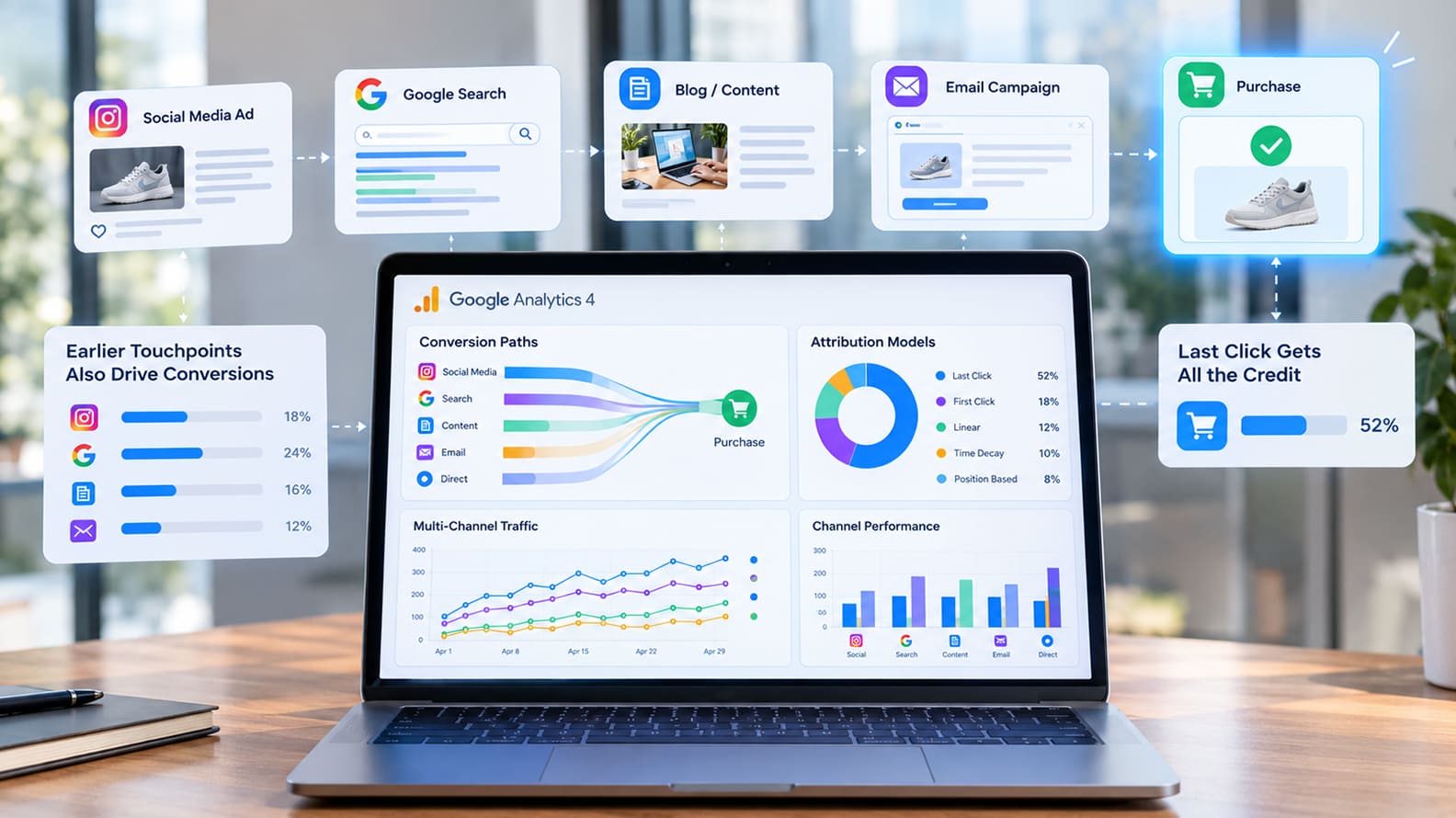
GA4 can show you much more than the final click before a conversion. The harder part is knowing how much credit to give each channel when real customer journeys rarely happen in a straight line.
Last-click reporting is easy to understand because it gives one channel all the credit for a conversion. The problem is that customers often discover a brand in one place, research it somewhere else, return through another channel and convert days or weeks later. When the final interaction gets all the credit, the channels that created awareness or moved the buyer forward can look weaker than they really are.
GA4 gives businesses better ways to study those journeys through attribution models and conversion paths. It still cannot perfectly explain every sale, especially when people switch devices, interact offline or move through channels that analytics cannot fully observe. The goal is to use attribution as one useful view of performance, then combine it with business context, CRM data and testing before making major budget decisions.
Imagine someone first discovers your business through a Facebook campaign, comes back a week later after searching for the problem on Google, reads two pages on your site, sees a retargeting ad and eventually searches your company name before filling out a form. Under a last-click view, branded search may appear to have created the conversion. In reality, it arrived at the end of a journey that several channels helped create.
A similar issue showed up in Dune London’s work with Google Shopping. Google reported that more than a quarter of Dune’s customer journeys involved multiple touchpoints, with Shopping appearing across a significant share of those paths. Looking only at the final interaction made some earlier activity appear less valuable than it was across the full journey.
GA4’s attribution reporting is designed to give businesses a broader view of that journey. Its data-driven attribution model uses observed conversion paths to estimate how different interactions contribute to a key event, while the attribution reports let marketers examine how credit changes when different models are applied. The point is not to produce a perfect answer. It is to get closer to how people actually discover, consider and eventually choose a business.
The difference becomes important once marketing budgets start moving around. If branded search keeps receiving most of the credit, it can look like the obvious place to invest more. A YouTube campaign, an industry article or a paid social campaign that introduced people to the brand may appear weaker because its influence happened earlier. Over time, a business can end up spending heavily on channels that capture existing demand while quietly reducing the channels that helped create it.
For small and mid-sized businesses, attribution becomes most useful when it changes the conversation from “Which channel got the sale?” to “What role did each channel play before the sale happened?” GA4 can help answer part of that question, especially once conversion paths start getting longer and the business is running several channels at the same time.
Once several channels are involved, the most useful view in GA4 is often the path people took before converting. The Attribution paths report shows how different touchpoints appear across the journey, along with details such as path length and the number of days it took to reach a key event. That is often more revealing than looking at a single channel total in isolation.
A paid social campaign may appear early in the journey, organic search may keep bringing the person back, and branded search may close the sale. Looking only at the final interaction makes those channels compete with each other. Looking at the path shows that they may have been doing different jobs at different stages.
For businesses with longer buying cycles, especially B2B, SaaS and professional services, that difference matters because the first interaction can happen weeks before anyone fills out a form or talks to sales.
GA4’s Attribution models report helps by showing how channel credit changes under different models. Google currently offers data-driven attribution and last-click options in GA4, and the comparison can be useful when one channel suddenly looks much stronger or weaker depending on the model.
A large swing does not automatically mean one model is right and the other is wrong. It tells you that the channel’s role in the journey is more complicated than a single number suggests.
For a small or mid-sized business, a few patterns are usually worth watching:
| What you see in GA4 | What it may be telling you |
| A channel appears frequently near the start of paths | It may be helping people discover the business |
| A channel appears repeatedly in the middle | It may be supporting research or consideration |
| Branded search dominates the final interaction | Earlier channels may be creating demand that search later captures |
| Many conversions involve several touchpoints | Single-channel reporting is likely hiding part of the journey |
| Conversions take days or weeks | Short reporting windows may undervalue earlier interactions |
The goal is not to turn every customer journey into a forensic investigation. Most growing businesses simply need enough visibility to avoid cutting a channel because it rarely gets the final click, or overfunding another because it happens to sit closest to conversion. Once you start seeing how people actually move across channels, attribution becomes much more useful as a decision aid.
GA4 can redistribute credit across a journey, but that does not mean the model suddenly knows which channel deserves more budget. Attribution is still working with observed behavior, modeled behavior and whatever tracking survived cookies, devices, browsers and consent choices. It can sharpen the picture, but it cannot turn marketing into a perfect ledger.
The limits become obvious once a journey leaves the browser. A prospect may hear about a company on a podcast, mention it to a colleague, return later through Google and eventually convert on a different device. A B2B buyer might read several pieces of content, speak to sales and only then fill out a form after searching the brand name. GA4 can only work with the interactions it can see, and Google is explicit about the fact that attribution relies on available event and conversion data.
For small and mid-sized businesses, the practical answer is to compare attribution with business outcomes outside GA4. CRM data can show whether a channel is producing qualified opportunities, larger deals or better customers even when its attributed conversions look modest. Platforms such as HubSpot can help connect marketing touches with pipeline, while ecommerce businesses can compare channel reporting against actual customer and revenue data in their commerce platform.
A simple way to keep the analysis grounded is to look at different evidence together:
| Question | Best place to look |
| Which channels appear across the customer journey? | GA4 attribution paths |
| Which channels are getting conversion credit? | GA4 attribution reports |
| Which sources generate qualified leads or deals? | CRM |
| Which campaigns create incremental lift? | Controlled experiments |
| Which customers spend more or stay longer? | Revenue and customer data |
Experimentation becomes especially useful when attribution models disagree with intuition or when a channel looks expensive on paper but seems to influence demand. Geographic tests, holdout groups and campaign pauses can show whether performance actually changes when the channel is removed. That kind of evidence is harder to produce, but it is often more useful than debating which attribution model is theoretically best.
For growing businesses, GA4 should help frame the question, not close it. The strongest decisions usually come from combining what the platform can observe with what sales, CRM and revenue data are showing elsewhere.
Attribution can only work with the data it receives, and a surprising amount of reporting confusion begins much earlier with inconsistent campaign tagging. If one team uses facebook, another uses Facebook, and a third uses paid-social for the same type of activity, GA4 may split what should have been one clean channel view into several different rows. The same thing happens when campaign names change midway through a launch or when links go out without the right UTM parameters.
Google’s current GA4 campaign URL guidance recommends using consistent values for source, medium and campaign, with lowercase naming as a practical way to avoid fragmentation. Those parameters feed directly into traffic-source dimensions and influence how GA4 classifies visits inside reports, so a messy naming convention can make the attribution problem look worse than it actually is.
The effect becomes easier to spot once several channels are running at the same time. A paid social campaign may appear under Paid Social in one report, Referral in another and Unassigned somewhere else because the tagging did not match GA4’s rules. Google’s default channel group definitions are rule-based, which means the platform can only classify traffic correctly when the source and medium values give it enough information to work with.
A simple naming structure is usually enough for a growing business:
| Field | Keep it consistent around |
| utm_source | The platform, such as google, linkedin, facebook or newsletter |
| utm_medium | The channel type, such as cpc, paid_social or email |
| utm_campaign | One agreed campaign name used everywhere |
| utm_content | The creative, placement or variation when you need that detail |
| utm_term | Keyword information when it is relevant |
Clean tagging will not solve attribution on its own, but it removes a lot of avoidable noise. Before a marketing team starts debating whether data-driven attribution is undervaluing paid social or overvaluing search, it is worth checking whether the traffic was classified properly in the first place. A good model sitting on top of inconsistent campaign data is still going to produce a confusing answer.
A conversion can happen days or weeks after the first interaction, which means the amount of history GA4 is allowed to consider matters more than most teams realize. The key event lookback window controls how far back a touchpoint can still receive attribution credit. If the window is too short for the way customers actually buy, earlier interactions simply fall out of the picture.
The right window depends heavily on the business. A local service with a short decision cycle may see most conversions happen within a few days, while a B2B software purchase can involve research, internal discussion and multiple return visits over several weeks. Looking at the same attribution window for both would create very different blind spots.
GA4’s Attribution paths report can help here because it shows how long conversion journeys take and how many touchpoints are involved. If a meaningful share of customers convert after 20, 30 or 60 days, a shorter lookback window will naturally favor the channels that appear closer to the final action.
A few checks are worth making before changing anything:
| What you see | What to investigate |
| Many conversions happen quickly | A shorter window may still capture most of the meaningful journey |
| Long gaps between first touch and conversion | Earlier channels may be disappearing from attribution |
| B2B or high-consideration purchases | Compare the window with the real sales cycle |
| Seasonal or infrequent purchases | Look at whether customers research much earlier than they buy |
| Large shifts after changing the window | Check which channels gained or lost eligibility for credit |
For small and mid-sized businesses, the goal is to make the measurement window resemble the buying cycle closely enough that the report reflects how customers actually move. A setting that looks technical in GA4 can materially change which channels appear valuable, especially when the journey is longer than the reporting setup assumes.
Attribution becomes useful when it changes what the business does next. If a channel repeatedly appears early in high-value journeys, that may justify protecting its budget even when last-click conversions look modest. If another channel keeps collecting the final conversion but contributes little elsewhere, it may be capturing demand more than creating it. The report matters because it changes how the team interprets performance.
Small and mid-sized businesses often have fewer channels and smaller budgets, which can actually make this easier. You do not need a complicated modeling exercise to spot patterns. A founder or marketing head can usually get a much clearer picture by comparing GA4 paths with lead quality, sales conversations and revenue over a few months.
If paid social keeps introducing strong prospects who later convert through search, that is useful evidence even if the paid social dashboard looks weaker on last click.
A practical review can stay focused on a few questions:
The answers will not always line up neatly. Marketing rarely gives you that luxury. A channel can look efficient in GA4 and still produce weak customers, while another can look expensive and consistently create the opportunities sales actually wants. When that happens, the wider business context should carry more weight than a single attribution score.
For growing companies, the point is to use GA4 as part of the decision, not as an automatic decision-maker. Attribution is most valuable when it helps you ask better questions about how demand is created, how buyers move and where the budget is genuinely doing useful work.
GA4 is most useful when it helps a business see beyond the final interaction. Customer journeys are often messy, especially once paid media, organic search, social, email and direct traffic all start influencing the same buyer. Last-click reporting compresses that journey into a single winner, which is convenient for reporting and often too simplistic for decision-making.
A better view comes from looking at the path, understanding which channels tend to introduce people, which ones support consideration and which ones appear closest to conversion. GA4 can help with that, especially through attribution paths, data-driven attribution and cleaner campaign tracking. The numbers still need context because analytics can only measure what it can observe.
Small and mid-sized businesses usually do not need a perfect attribution model. They need enough clarity to avoid obvious mistakes, such as cutting a channel that is creating demand because it rarely gets the final click, or overinvesting in a channel that mostly captures people who were already close to buying.
The strongest measurement approach combines GA4 with CRM data, lead quality, revenue and testing where the stakes are high enough. Attribution then becomes one part of a broader picture of what is actually helping the business grow, which is a much more useful role for it than pretending one report can explain every sale.
Attribution in GA4 is the way conversion credit is assigned across the marketing interactions that happened before a key event. A customer might arrive through paid social, return through organic search, click an email and then convert after a branded search. Attribution determines how much credit each of those interactions receives in reporting.
GA4 supports data-driven attribution and last-click views, which can produce very different pictures of the same journey. The point is not to find one perfect number. It is to understand how different channels contribute before the conversion and use that information alongside CRM, revenue and customer data.
Last-click attribution gives all the credit to the final eligible interaction before conversion. That makes the reporting easy to read, but it can overstate the importance of channels that appear near the end of the journey, especially branded search, direct traffic and retargeting.
The problem becomes more serious when budgets are based on that view alone. A channel that created initial awareness may look weak because it rarely closes the sale, while a channel that mainly captures existing demand may look highly efficient. Over time, that can push spend toward the end of the funnel and reduce investment in the activity that creates future demand.
GA4’s data-driven attribution model uses conversion-path data from the property to estimate how different marketing touchpoints contribute to key events. Credit can then be distributed across several interactions instead of being assigned entirely to the final click.
The model is useful because it reflects the actual paths seen in the account, but it still depends on the data GA4 can observe. Missing campaign tags, cross-device behavior, consent choices and offline interactions can all create gaps, so the model should be treated as a better view of the journey rather than a complete explanation of every conversion.
For many small and mid-sized businesses, data-driven attribution is useful once several channels are influencing the same customer journey. If people regularly interact with paid search, social, email and organic content before converting, looking beyond the final click gives the marketing team a much more useful picture.
A business with very simple journeys may not need to spend much time debating attribution models. The value increases as the buying cycle becomes longer, the media mix becomes broader and more budget decisions depend on understanding which channels are helping earlier in the journey.
Attribution paths show the sequence of marketing interactions that happened before a key event. They can help reveal which channels commonly appear at the beginning, middle or end of a conversion journey, along with information such as path length and time to conversion.
For a marketing team, those patterns can be more useful than a single conversion total. A channel that rarely receives final-click credit may appear repeatedly near the beginning of valuable journeys, while another may mostly show up at the end. Seeing both roles makes it easier to judge performance with more context.
A lookback window controls how far back GA4 can consider an interaction eligible for attribution credit before a key event. If a customer first discovers the business well outside that window, the earlier interaction will not appear as part of the attributed journey.
The setting should make sense for the way customers actually buy. A local service with a short decision cycle may need a much shorter window than a B2B company where prospects research for several weeks. If the window is too short, earlier channels can disappear from the analysis even when they influenced the eventual conversion.
No analytics platform can observe every influence behind a purchase. A customer may hear about a company from a colleague, see an offline advertisement, listen to a podcast or switch devices before converting. Some of those interactions may never appear in GA4.
Attribution is still valuable because it gives businesses a structured view of the interactions they can measure. The strongest decisions usually come from comparing that view with CRM records, lead quality, customer conversations, revenue and experiments that test whether performance changes when marketing activity is adjusted.
Google Ads, Meta and other advertising platforms each use their own attribution rules, identity signals, conversion windows and reporting logic. GA4 has its own measurement and attribution setup, so the same customer journey can legitimately produce different conversion counts across platforms.
The difference does not automatically mean one system is broken. Marketing teams should understand what each platform is counting and avoid adding conversions from different systems together as if they were directly comparable. GA4 can provide a more cross-channel view, while platform reporting remains useful for understanding performance inside each advertising ecosystem.
UTM parameters are important because they tell analytics tools where campaign traffic came from. Consistent values for source, medium and campaign make it much easier for GA4 to group traffic correctly and show meaningful channel performance.
Poor tagging can create unnecessary confusion. The same platform may appear under several different names, paid traffic may fall into the wrong channel group and campaigns can become difficult to compare over time. A simple naming convention used consistently across the team usually improves attribution reporting more than adding another layer of complexity to the model.
GA4 should be combined with the systems that show what happened after the website conversion. CRM data can reveal lead quality, opportunity value and closed revenue, while ecommerce systems can show repeat purchases, margins and customer value. Those outcomes often matter more than the conversion count shown in an analytics report.
Testing can add another layer when the decision is important enough. Geographic experiments, holdouts and controlled campaign changes can help show whether performance actually moves when a channel is increased, reduced or removed. That gives businesses evidence about incremental impact, which attribution models alone cannot always provide.
Oct 16, 2026 / 27 min read

Oct 14, 2026 / 27 min read

Oct 13, 2026 / 33 min read