
How to Create a Cybersecurity Checklist for New Employees and Contractors
Sep 15, 2026 / 24 min read
August 7, 2026 / 41 min read / by Team VE
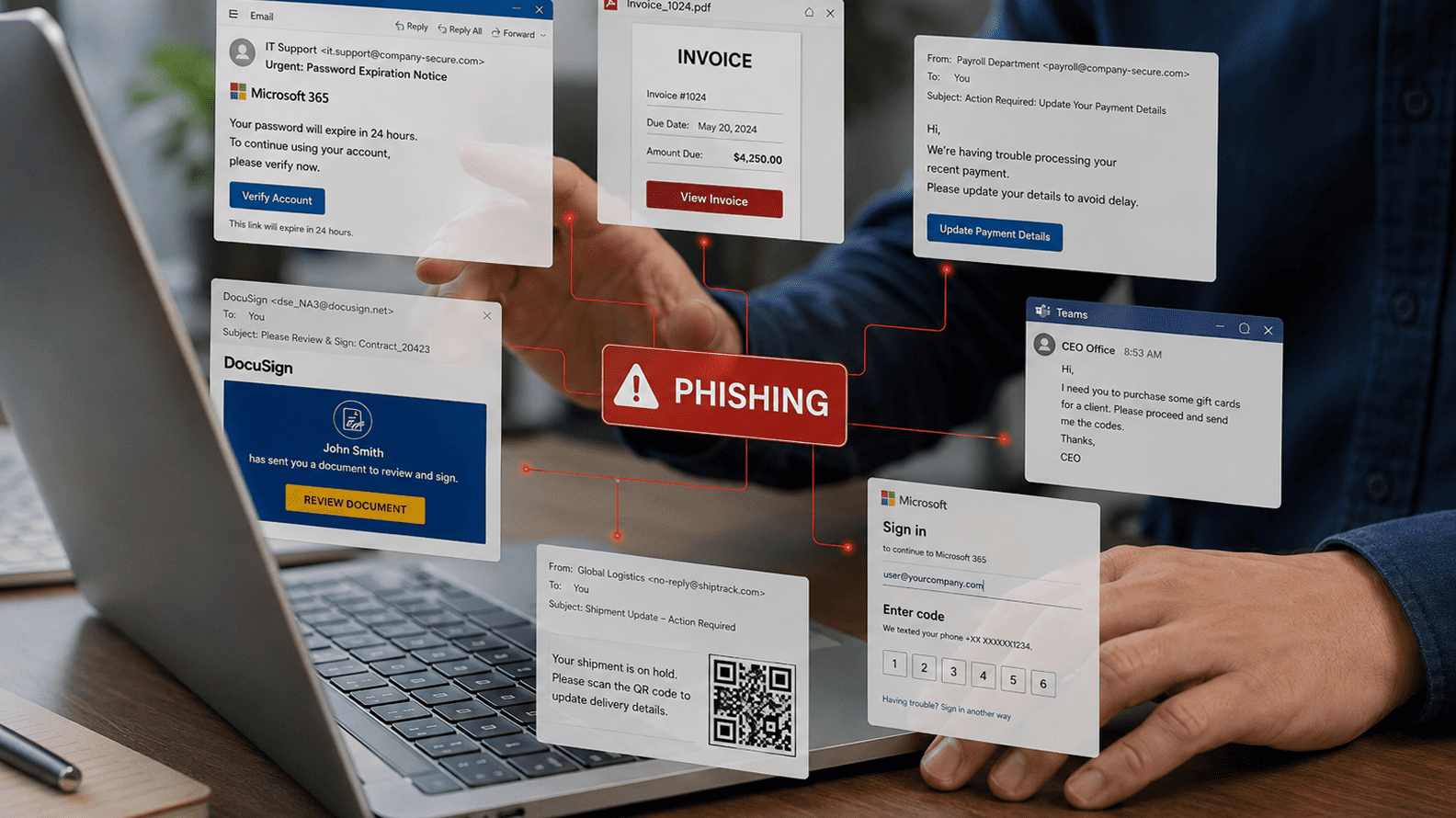
Phishing is a failure of environment, workflow design, identity controls, and organizational habits. Attackers understand how busy teams behave under pressure, and they design their lures around that reality.
Phishing still works because knowing what phishing looks like is not the same as being able to spot it in the middle of real work. Employees operate inside inboxes, chat tools, CRMs, payment systems, ticketing queues and cloud platforms where urgency, authority and familiar brand cues constantly shape what feels routine.
The most effective phishing messages exploit that normality, making clicking, approving, replying or scanning feel less like a risky decision and more like the obvious next step in a task the employee already believes they are completing.
That is why phishing is better understood as an operating problem, not simply a training problem. Detection becomes harder when a message closely matches the recipient’s real work context, arrives through a familiar channel and asks for an action that feels entirely plausible.
Training still matters, but it works best when it is supported by stronger identity controls, safer approval processes, better email and endpoint protection, and workflows designed on the assumption that even experienced employees can make the wrong decision under the right conditions.
In 2022, Twilio was hit by a phishing campaign in which employees received text messages designed to look like internal IT communication and were directed towards fake login pages. Once some credentials were entered, attackers were able to use them to access internal systems and customer data.
What makes the incident useful is not that employees at a major technology company somehow did not understand phishing, but that the message looked close enough to an ordinary piece of work to deserve a response. Twilio’s own explanation of how smishing attacks use urgency, familiarity and counterfeit websites captures the problem well: the attacker does not need the victim to behave irrationally, only to behave normally in the wrong context.
That distinction matters because the traditional story about phishing has become too simplistic. For years, awareness training was built around obvious warning signs such as poor grammar, suspicious attachments, strange domains and implausible requests. Those lessons still have value, but the attack has moved much closer to the texture of everyday work.
A recruiter may receive what looks like a candidate document, a finance employee may see what appears to be an urgent request from a senior executive, and an employee may receive a password-reset message that looks almost identical to a legitimate IT notification. In each case, the attacker is not asking the victim to suspend common sense. The attacker is trying to make the malicious action resemble a task the employee already performs.
The delivery mechanisms have widened considerably as well. Proofpoint’s research into URL-based phishing found that malicious URLs were being used around four times more often than attachments in malicious email, while at least 55% of suspected SMS phishing messages contained malicious URLs.
The same research identified 4.2 million QR-code threats in the first half of 2025, which is a useful reminder that phishing is no longer something that lives neatly inside the email inbox. It now follows employees into text messages, collaboration tools, QR codes, cloud applications and other channels where the usual visual warning signs may be weaker or absent altogether.
The psychology underneath the attack has changed much less than the technology around it. Attackers still rely on authority, urgency, curiosity, fear and routine, but they now have far better ways to make those cues believable. Public information from LinkedIn and company websites can reveal reporting lines, suppliers, job titles and current projects.
Compromised email accounts can provide the right sender name, conversation history and tone. Generative AI can remove many of the language mistakes that once made phishing easier to identify, while collaboration platforms and SMS create environments in which employees may apply less scrutiny than they would to a suspicious email.
This is why Proofpoint’s 2025 Human Factor research matters beyond the usual awareness-training discussion. It found social engineering in 25% of the advanced persistent threat campaigns it analysed, including phishing, business email compromise and other attacks that depend on manipulating a person’s judgment rather than simply exploiting a software flaw.
That points to a deeper problem. The attacker is no longer merely testing whether an employee remembers a list of warning signs from last quarter’s training. They are testing whether they can create enough contextual credibility for the employee to complete one apparently reasonable action.
The 2023 MGM Resorts incident shows how quickly that one action can become a much larger business problem. In its subsequent filings, MGM described how the cyber incident forced parts of its technology environment offline, disrupted operations across its US properties and created financial, legal and regulatory consequences.
The company’s 2023 annual report also records that customer information was accessed, including contact details and, for some individuals, driver’s licence, Social Security or passport information.
There is another detail in the same filing that deserves more attention. MGM states that employees with network access receive cybersecurity awareness training. That does not make training pointless, nor does it mean the incident happened because training failed.
It shows something more important: awareness is one control among many, and organisations get into trouble when they quietly expect it to compensate for weaknesses elsewhere, whether that means loose identity verification, excessive privileges, weak helpdesk procedures or approval processes that place too much trust in a single human decision.
Once phishing is viewed through that lens, the question changes. Instead of asking why an employee clicked something they had been warned about, the more useful question is why that click, login, approval or conversation was capable of carrying so much risk in the first place. That is where phishing stops being a narrow training problem and starts becoming a question of human behaviour, workflow design and technical controls working together.
The gap between phishing awareness and phishing resistance is mostly a gap between knowledge and context. Employees may know the rules, but they encounter suspicious messages while answering clients, approving invoices, switching between SaaS tools, clearing notifications and trying to keep work moving.
In that setting, the decision is rarely, “Is this phishing?” It is usually, “Does this look normal enough for me to continue?” That distinction is exactly why the NIST Phish Scale evaluates both the visible warning cues in a message and how closely its premise matches the recipient’s real working context.
That contextual fit matters more than many awareness programmes admit. A payroll-themed lure sent to someone in finance, a shared-document alert sent to a manager who has just left a meeting, or an MFA prompt arriving during a genuine login sequence all begin with a degree of credibility that generic phishing examples do not have.
NIST developed the Phish Scale partly because raw click rates can be misleading if the difficulty of the lure itself is ignored. An employee who spots an obvious fake and misses a highly contextual one has not suddenly forgotten their training. The second message simply required a harder judgment.
The behavioural side is just as important. Authority, urgency and familiarity do not make people irrational; they change how much scrutiny a request receives.
A junior employee may hesitate before delaying something that appears to come from a senior executive, while a finance manager may move quickly on what looks like a time-sensitive payment request because urgency is already part of the job. Attackers exploit those patterns because they only need to make verification feel slightly more inconvenient than compliance for a few seconds.
Repetition adds another layer. Employees scan QR codes, approve sign-in prompts, open shared files, authenticate into cloud apps and respond to automated notifications throughout the day. Every legitimate interaction teaches them what normal looks like, and attackers imitate that normality.
This is why phishing has become harder to isolate as an “email problem”. The attack can now arrive through SMS, collaboration tools, fake support conversations, QR codes or cloud login pages, all of which sit inside workflows employees already trust.
Research is beginning to show the practical effect of that shift. A 2025 field study involving 12,511 employees at a US fintech company found that click rates rose from 7% on easier phishing lures to 15% on more difficult ones, while the training interventions tested did not produce a statistically significant overall reduction in clicking.
The useful takeaway is not that awareness training is pointless. It is that message difficulty and situational context can outweigh simple familiarity with phishing concepts, especially when the lure fits the recipient’s work closely enough.
The better security model therefore assumes that some convincing phishing attempts will eventually succeed and focuses on limiting what happens next. If one stolen password can open critical systems, one helpdesk conversation can reset a privileged account, or one employee can approve a sensitive transaction without secondary verification, the organisation has concentrated too much security responsibility in a single human decision.
That is where phishing stops being mainly an awareness problem and becomes a question of identity controls, workflow design and how much authority any one action is allowed to carry.
Phishing becomes far more dangerous when the attacker does not need to compromise an entire organisation, but only the one person who sits at a critical point in a workflow.
Customer support teams can reset accounts, finance teams can change payment details, recruiters open files from strangers as part of their job, administrators grant access, and executives approve exceptions. These roles are attractive because the attacker is not simply targeting a person. They are targeting the authority attached to that person’s normal work.
Mailchimp experienced this problem repeatedly. In one 2022 incident, the company said a social-engineering attack compromised employee credentials and gave an attacker access to an internal tool used by customer-facing teams for account administration. Mailchimp disclosed that 319 customer accounts were viewed and audience data was exported from 102 of them.
The interesting part of the case is the route the attacker chose. Rather than breaking directly into hundreds of customer accounts, they reached a smaller group of employees whose existing support privileges provided access to those accounts.
The same pattern appeared again in January 2023, when Mailchimp said attackers used compromised employee credentials to access 133 customer accounts. Repeated incidents of this kind show why privileged support and administrative workflows deserve the same scrutiny as technical infrastructure.
A support tool may not look as sensitive as a production database, but if it can change identities, inspect customer information or alter accounts, it becomes an unusually efficient target for social engineering.
The risk is easiest to see when the workflow is broken into its component parts:
| Workflow | What the attacker is really trying to obtain | Why phishing can work |
| Password or account recovery | Control of another user’s identity | Support staff are expected to help people who cannot authenticate normally |
| Supplier bank-detail changes | Control of where money is sent | Finance teams routinely process legitimate changes and invoices |
| SaaS administration | Access to customer or company accounts | Administrators already have elevated permissions |
| Recruitment | Execution of malicious files or links | Opening unfamiliar documents is part of normal work |
| Executive approvals | Authority to bypass normal process | Hierarchy and urgency can reduce the likelihood of challenge |
| Customer support | Ability to alter accounts or expose data | Employees are rewarded for resolving access problems quickly |
This is why stronger security often comes from changing the workflow rather than trying to make the employee more suspicious. A bank-account change that requires confirmation through an independently verified channel is much harder to manipulate than one approved from an email thread.
A privileged password reset that requires stronger identity proofing gives a helpdesk employee less discretion to be socially engineered. Sensitive administrative actions can require step-up authentication or secondary approval, while access can be restricted so that support staff only see what they need for the task in front of them.
The same principle applies to authentication itself. Not every form of multi-factor authentication creates the same barrier. One-time codes and push notifications can still be captured, relayed or manipulated during a convincing phishing flow, whereas CISA specifically recommends FIDO/WebAuthn as a widely available form of phishing-resistant MFA.
The important difference is that the authentication process itself checks the legitimate web origin, reducing the amount of judgment the employee has to exercise when a fake login page looks convincing.
Cloudflare demonstrated the value of this in 2022 when its employees were targeted by the same broad phishing campaign that affected several technology companies.
Cloudflare reported that three employees entered their credentials into the phishing site, yet the attackers could not use those credentials to access company systems because employees were required to authenticate with FIDO2-compatible hardware security keys. The human layer was successfully deceived, but the control behind it refused to translate that mistake into access.
That example is useful because it reframes what a good phishing defence should achieve. The goal is not to create an employee population that never makes a wrong decision, because no realistic security programme can guarantee that. The stronger objective is to reduce the number of situations in which one wrong decision is enough.
When payment changes require independent verification, privileged actions require stronger authentication, administrative permissions are tightly scoped and account recovery cannot be talked through casually, phishing has much less room to turn persuasion into control.
Most successful phishing does not depend on creating a perfect fake. It depends on reducing the amount of scrutiny a person gives the request. Urgency does this by shortening the perceived decision window. Authority does it by making hesitation feel costly.
Familiarity does it by making the request look like something the employee has already seen dozens of times. When those signals appear together, the employee is no longer evaluating an isolated message. They are responding to a situation that appears to make sense.
Business email compromise shows this particularly well because the fraud often contains very little technical sophistication once the attacker has enough context.
The FBI describes BEC as one of the most financially damaging forms of online crime precisely because attackers impersonate known executives, suppliers or business contacts making apparently legitimate requests. In many cases, the request is timed around a genuine invoice, travel schedule or existing email conversation, which gives the victim fewer reasons to stop and question it.
The authority effect is especially powerful when the request appears to come from someone senior. A message from an unknown sender asking for a wire transfer creates immediate suspicion, while the same request apparently coming from a CFO or CEO creates a different problem: employees may understand that verification is sensible but still feel that delaying the request carries a social or professional cost.
The FBI has documented how attackers study company structures and employee routines before sending payment requests, sometimes waiting until a senior executive is travelling or otherwise difficult to contact. What looks like urgency in the message may therefore be the result of considerable patience on the attacker’s side.
Familiarity works in a similar way. If an attacker has gained access to a genuine mailbox or email thread, they no longer have to invent the business context because the organisation has already created it for them. Invoice numbers, supplier names, writing styles and payment schedules can all be copied from legitimate correspondence.
The FBI specifically warns that criminals can use compromised email accounts and existing billing conversations to time fraudulent payment requests so that they resemble normal transactions.
The pattern becomes clearer when the three pressures are viewed together:
| Psychological cue | What the employee experiences | How the attacker uses it |
| Urgency | “This needs to be done now.” | Creates a reason to skip normal verification |
| Authority | “This came from someone senior.” | Makes questioning the request feel uncomfortable or risky |
| Familiarity | “This looks like our normal process.” | Reduces suspicion because the request fits an existing workflow |
| Continuity | “This is part of a conversation already happening.” | Uses genuine context to make the fraudulent step feel inevitable |
| Consequence | “If I delay this, I may create a problem.” | Shifts attention from security risk to operational risk |
The most effective attacks tend to combine several of these rather than relying on one. A supplier asks finance to use “updated banking details” on an invoice that is already expected. The message comes from an account the employee recognises, refers to a real project, and explains that payment needs to be cleared before the end of the day. Nothing about the request necessarily feels dramatic. In fact, its strength is that it feels routine enough to process quickly.
This is also why better verification processes need to interrupt the psychology of the attack rather than merely tell employees to be more careful. The FBI recommends confirming changes to payment instructions through a separate, trusted communication channel rather than relying on the details supplied in the message itself.
That simple separation matters because it gives the employee permission to slow the process down. Verification is no longer an act of suspicion toward a senior colleague or supplier. It becomes an ordinary part of the workflow.
For growing companies, this distinction is important. Security controls work better when they remove the social burden from the employee. A finance manager should not have to decide whether questioning the CEO will make them look difficult.
The system should require verification for unusual payment changes regardless of who appears to request them. A support employee should not have to decide whether a caller sounds convincing enough to deserve an account reset. The process should define what evidence is required before the reset can happen.
One reason phishing remains effective is that modern employees are asked to make security decisions constantly, often without experiencing them as security decisions at all. They approve sign-ins, dismiss browser warnings, accept sharing requests, authenticate into cloud applications, respond to password prompts and deal with device notifications throughout the day.
Most of those interactions are legitimate, which means repetition gradually changes their meaning. A prompt that once demanded attention can become another piece of interface noise, especially when it appears during a task the employee is already trying to complete.
MFA fatigue attacks exploit that conditioning directly. Instead of persuading the victim with a sophisticated story, the attacker repeatedly triggers authentication requests and waits for one to be accepted, whether through confusion, habit or simple irritation.
Microsoft has described this as a growing attack pattern and found in its own studies that around 1% of users accepted a simple MFA approval request on the first attempt. One percent sounds small until the same technique can be repeated across hundreds or thousands of accounts, at which point a behaviour that looks statistically minor becomes operationally useful to an attacker.
The design of the prompt matters because an approval request with almost no context asks the employee to make a security judgment from very little information. A simple “Approve” or “Deny” interaction does not necessarily tell the user which application is requesting access, where the login originated or whether it relates to something they actually initiated.
Microsoft responded to this problem by making number matching part of Microsoft Authenticator push notifications, requiring the user to enter a number displayed on the login screen rather than merely accepting a push. The security improvement is not simply another training message. It changes the interaction so that accidental approval becomes more difficult.
The same principle applies far beyond MFA. A security warning has value only while the user can distinguish it from the normal flow of work. Once every file produces a banner, every application requests permissions and every authentication journey contains another prompt, employees begin learning which obstacles can usually be cleared without consequence.
Attackers benefit from that learned behaviour because they can hide malicious requests inside interfaces that resemble the legitimate friction employees already experience.
| Repeated interaction | What employees gradually learn | How an attacker can exploit it |
| MFA push notifications | Approval is normally part of signing in | Trigger repeated prompts until one is accepted |
| Cloud login pages | Re-authentication happens frequently | Insert a convincing credential page into a normal workflow |
| Document-sharing alerts | Links from collaboration tools are routine | Send a fake SharePoint, Google Drive or DocuSign notification |
| QR codes | Scanning is a convenient shortcut | Move the victim to a malicious site outside normal email inspection |
| Permission requests | Applications regularly ask for access | Present a malicious OAuth consent request as a normal integration |
| Password-reset notices | Credentials occasionally need updating | Create urgency around a fake reset or expiry warning |
What changes the outcome is usually not another reminder to “pay attention”, but better interaction design. Microsoft’s move toward number matching and additional sign-in context is a good example because it gives the employee something concrete to verify rather than asking them to make an abstract judgment about whether a notification feels suspicious.
Microsoft has said that number matching and additional context eliminated MFA fatigue attacks in the live customer environments it studied, which illustrates how much can change when the system demands evidence rather than a reflexive approval.
There is a broader lesson here for phishing defence. Security teams should look closely at every place where employees are repeatedly asked to make low-information trust decisions. If a user receives twenty legitimate prompts for every malicious one, telling them to treat each prompt as a high-stakes security event is unlikely to scale.
A better system reduces unnecessary prompts, gives users enough context to understand what they are approving, and makes sensitive actions harder to complete accidentally.
This is also why phishing-resistant authentication is receiving so much attention. Traditional SMS codes, email OTPs and push approvals can still leave room for social engineering or interception, while Microsoft’s current guidance on phishing-resistant MFA explicitly treats these older methods as increasingly vulnerable to modern phishing and MFA-bombing techniques.
The direction is important because it shifts security away from repeatedly asking employees to recognise danger and towards authentication mechanisms that can reject the wrong interaction even when the person behind the keyboard has been convinced.
For growing companies, the practical question is therefore not how many security prompts can be added, but how many unnecessary decisions can be removed. The more often employees are forced to distinguish legitimate friction from malicious friction, the more opportunities attackers have to hide inside the pattern.
Good phishing defence reduces that ambiguity by making unusual actions visibly unusual and by ensuring that routine behaviour cannot silently grant extraordinary access.
For years, phishing defence was built around a fairly simple mental model: the attacker creates a fake login page, the employee enters a password, and the attacker steals it. That still happens, but some of the more interesting attacks now target the trust relationships around cloud identity rather than the password itself.
In an OAuth consent attack, for example, the employee may sign in through a legitimate Microsoft or Google authentication flow and still give a malicious application access to email, files or other company data. Microsoft has described how OAuth consent phishing can succeed even when the sign-in page itself is genuine, because the deception sits in the permission request rather than in the login screen.
That matters because many of the warning signs employees are trained to look for simply disappear. The domain may be legitimate, the authentication interface may be real, HTTPS may be present, and the employee may never type a password into an attacker-controlled page.
The dangerous decision is the moment they approve access for an application that should never have been trusted. Once that consent is granted, Microsoft notes that the malicious application can continue accessing data even when the user is no longer actively signed in, depending on the permissions and tokens it has received.
This is part of a broader shift in phishing from credential theft towards session, token and identity abuse. Microsoft has documented several variants, including adversary-in-the-middle phishing, device-code phishing and device-join attacks, where attackers target authentication tokens or legitimate identity workflows rather than relying solely on stolen passwords.
In some cases, the victim has technically authenticated correctly. The attacker has simply manipulated what happens around that authentication.
| Older phishing model | Newer identity-focused model |
| Steal the password | Obtain a token, consent grant or trusted session |
| Fake the entire login page | Abuse a legitimate authentication or consent flow |
| Depend heavily on bad domains | Hide inside trusted cloud infrastructure |
| Use the credential once | Seek persistent access through refresh tokens or app permissions |
| Train the user to spot the fake page | Control what users are allowed to approve in the first place |
The defensive implication is important. If employees are free to authorize almost any third-party application, the organisation has effectively delegated part of its access-control model to individual judgment. A user may believe they are installing a harmless productivity tool while granting it permission to read mail, access files or act on their behalf.
Microsoft therefore recommends restricting user consent to verified publishers and low-risk permissions rather than expecting every employee to understand the security implications of a permissions screen.
The same logic applies to helpdesk and recovery workflows. Okta has reported campaigns in which attackers contacted IT service desks and persuaded staff to reset MFA factors for highly privileged accounts. Once the reset succeeded, the attackers could use legitimate identity features to move further into the environment.
This is a good example of why phishing and social engineering have become difficult to separate from identity architecture. The attacker is not necessarily breaking the authentication system. They are persuading the organisation to reconfigure it on their behalf.
More recent activity has pushed the same idea into payroll and HR systems. Okta Threat Intelligence described a campaign in which attackers impersonated employees to helpdesks, obtained password resets and then targeted banking details in HR and payroll applications. Again, the weakness was not simply that someone “fell for phishing”. The attacker understood which business process could convert an identity reset into money and targeted that process directly.
This changes what good phishing defence looks like. Security teams still need email filtering, awareness training and reporting mechanisms, but they also need to ask harder questions about what a successfully deceived employee is actually allowed to do. Can users approve third-party applications without review?
Can support staff reset privileged identities without strong verification? Can a newly authenticated session immediately reach payroll, finance or administrative systems? Can refresh tokens remain valid after suspicious activity is detected? These questions sit closer to the real attack path than another reminder about checking spelling mistakes.
The deeper lesson is that modern phishing increasingly succeeds by borrowing legitimacy from the systems organisations already trust. The attacker may use the real login page, the real identity provider, the real support process or the real SaaS platform, and manipulate only the decision that connects them together. Once that happens, awareness still matters, but architecture determines how far the mistake can travel.
Many companies judge phishing awareness programmes by one number: how many employees clicked the simulated lure. It is an easy metric to understand, easy to put on a dashboard and easy to show management as evidence that training is improving.
The problem is that click rate on its own says surprisingly little about how well the organisation would handle a real attack. NIST has explicitly warned against interpreting phishing exercises without considering message difficulty, because a 5% click rate on an obvious lure and a 5% click rate on a highly contextual one represent very different levels of employee resistance.
This is where phishing programmes can become performative without anyone intending them to. If the objective becomes reducing the quarterly click rate, teams naturally gravitate towards familiar simulations, repeat training and easier-to-explain results.
What gets missed is whether employees are becoming better at recognising the kinds of attacks the company actually faces, whether they report suspicious activity quickly enough for security teams to act, and whether one successful click still gives an attacker useful access. A company can therefore produce an impressive awareness dashboard while remaining vulnerable to the exact attack paths that matter most.
A better set of measurements looks at behaviour around the incident rather than treating the click as the whole event.
| Metric | What it actually tells you |
| Click or interaction rate | How many people engaged with a particular lure |
| Phish difficulty | How hard that specific message was to recognise |
| Reporting rate | Whether employees escalate suspicious activity instead of simply deleting it |
| Time to first report | How quickly security gains visibility after an attack begins |
| Credential submission rate | Whether interaction progressed into actual identity exposure |
| Repeat susceptibility | Whether the same people or functions remain vulnerable over time |
| Control effectiveness | Whether MFA, email security or access controls stopped the attack after human interaction |
| Role-specific exposure | Whether higher-risk functions such as finance, HR or IT support behave differently from the company average |
The reporting side deserves much more attention than it usually receives because an employee who makes a mistake and reports it immediately can be considerably less dangerous than someone who never clicks but also never alerts security when something looks wrong. Reddit illustrated this distinction after its 2023 breach.
The company said an attacker obtained one employee’s credentials through a phishing site that imitated its intranet gateway, but the employee self-reported soon afterwards, allowing Reddit’s security team to remove the attacker’s access and begin investigating. The employee was successfully phished, yet the reporting behaviour helped contain what happened next.
This is a more realistic model of resilience. Security teams should want employees to recognise attacks before interacting with them, but they should also assume that some attacks will be convincing enough to get through.
Once that assumption is accepted, rapid reporting becomes part of the defence rather than an admission that the defence has failed. An employee who feels safe saying, “I think I just entered my password into the wrong page,” gives the organisation an opportunity to revoke sessions, reset credentials, inspect logs and warn other employees while the incident is still developing.
The culture around simulations matters here because overly punitive programmes can produce exactly the wrong behaviour. If employees associate phishing exercises with embarrassment, public scoreboards or disciplinary consequences, they have a reason to hide mistakes when a real incident occurs.
A mature programme should therefore separate accountability from humiliation and make reporting frictionless enough that employees do not have to decide whether an incident is “serious enough” before raising it. The security team would usually rather receive ten harmless reports than discover one genuine compromise several hours later.
The NIST Phish Scale was designed partly to put reporting and click rates into the context of detection difficulty, which is a much more useful way of reading simulation results. A difficult lure that attracts more clicks but is reported quickly may expose a different weakness from an easy lure that still catches a large group of employees.
The first may justify better technical controls or more realistic role-based exercises, while the second may reveal a more basic awareness problem.
For growing companies, the practical shift is to stop asking whether the phishing score is improving and start asking whether the organisation is becoming harder to compromise and faster to recover when someone is deceived. Those are related questions, but they are not the same, and confusing them is one reason awareness programmes can look successful right up until a real attacker tests the parts of the system that the dashboard never measured.
One reason phishing training underperforms is that too much of it is detached from the situations employees actually face. A generic lesson about suspicious links may be technically correct, but it does little to prepare a finance team for a supplier payment change, a recruiter for a malicious CV, or a helpdesk analyst for a convincing identity-reset request.
The closer training gets to the real decisions people make in their roles, the more useful it becomes, because it teaches employees to recognise risk inside familiar work rather than only inside obviously suspicious scenarios.
This is also where role-based simulations become more valuable than company-wide exercises built around the same lure. Finance should be tested on invoice fraud, payment diversion and executive impersonation. HR should see fake payroll changes, candidate documents and benefits requests.
IT support should encounter identity-reset and MFA-reset scenarios. Developers may be better tested with repository invitations, package alerts or cloud-access requests. The point is not to create elaborate traps. It is to test the areas where a believable request can lead directly to meaningful access or financial loss.
The difference can be framed quite simply:
| Generic awareness approach | Role-based approach |
| Same phishing email sent to everyone | Scenarios based on actual job responsibilities |
| Measures who clicked | Measures how people respond to relevant risk |
| Focuses on visual warning signs | Focuses on context, authority and workflow |
| Annual or quarterly exercise | Ongoing testing around higher-risk functions |
| Training delivered after failure | Training linked to the exact mistake or decision |
| Company-wide score | Role-specific risk picture |
This also changes how security teams should interpret failure. If a recruiter clicks a fake CV link, that tells you less about the recruiter’s intelligence than it does about how exposed the recruitment workflow may be.
If a finance employee nearly approves a fraudulent banking change, the response should not end with another awareness module. It should trigger a review of the approval process itself, including whether payment-detail changes require independent verification and whether unusual transactions automatically receive additional scrutiny.
The strongest training programmes therefore work alongside control changes. If a simulation shows that employees struggle to identify fake cloud login requests, the answer may be better authentication design. If support staff are vulnerable to identity-reset social engineering, the answer may be stricter verification procedures.
If executives routinely approve requests through informal chat channels, the answer may be to formalise which actions require a second channel or secondary approval. Training reveals where judgment is being stretched, but operational design determines whether that weakness becomes an incident.
This is where phishing awareness becomes genuinely useful. It stops being a compliance ritual and becomes a diagnostic tool for the organisation. The objective is not to produce employees who never make mistakes, but to understand where mistakes are most likely, which roles carry the most consequence, and which workflows need to be redesigned so that a believable message cannot easily turn into access, money or data loss.
Once phishing is treated as an operating risk rather than a training problem, the defensive model becomes much clearer. No single control is expected to stop every attack, and no single employee is expected to make the right decision every time.
The objective is to make the attack work harder at every stage, so that a convincing message still has to survive email filtering, identity controls, approval rules, access restrictions and reporting mechanisms before it can produce meaningful damage.
That layered approach is reflected in CISA’s phishing guidance, which combines user awareness with stronger authentication and technical protections rather than presenting training as the whole answer. The same principle appears in Microsoft’s guidance on phishing-resistant MFA, where the focus is on reducing reliance on user judgment by using authentication methods that are harder to replay, relay or socially engineer.
For a growing company, the useful way to think about the stack is not as a list of security products but as a series of questions that an attacker has to answer successfully.
| Layer | What it should prevent or limit |
| Email and messaging controls | Obvious malicious links, attachments, impersonation and known bad infrastructure |
| Identity and authentication | Stolen credentials being converted into access |
| Access controls | One compromised account reaching too much of the environment |
| Approval workflows | One person authorising sensitive financial or administrative actions alone |
| Endpoint and browser protections | Malicious payloads, unsafe pages and suspicious execution |
| User reporting | Delays between suspicious activity and security response |
| Incident response | A successful phish becoming a prolonged compromise |
The order matters because attackers often succeed by moving through several layers rather than defeating one dramatic control. A malicious email reaches the inbox, the user clicks, credentials are captured, the account signs in successfully, the attacker reaches a cloud application, and then privileges or payment workflows turn access into impact.
If the organisation has only trained the user, the whole chain depends on one decision. If several controls sit behind that decision, the attack has multiple opportunities to fail.
Cloudflare’s 2022 experience remains a useful model of that principle because the company acknowledged that some employees entered their credentials into a phishing site, yet its use of hardware security keys stopped the attackers from completing the login. The interesting part is not that employees clicked. It is that the organisation had designed the next step so that the click did not automatically become a breach.
The same logic applies to financial fraud. An employee may believe a fraudulent payment request, but if bank-detail changes require out-of-band verification and a second approver, the attacker still has another control to defeat.
A helpdesk analyst may be persuaded by a caller, but if privileged resets require stronger identity verification and additional approval, the social engineering attempt has less authority. A compromised account may exist, but if access is tightly scoped and risky actions trigger step-up controls, the attacker’s room to move is reduced.
This is where smaller and mid-market companies often have an advantage that is easy to overlook. Their environments may be less mature, but they are also usually less bureaucratic, which means high-risk workflows can sometimes be changed quickly once the exposure is understood.
Payment approvals, privileged access, helpdesk verification and MFA policy can all be tightened without waiting for a multi-year security transformation. The challenge is deciding which controls matter most, which is why the final part of the article should move from theory into a practical framework for prioritising phishing defences based on business risk rather than buying more tools.
Most growing companies do not need a larger phishing programme as their first move. They need to identify the handful of workflows where one compromised account, one persuasive message or one rushed approval could create disproportionate damage, then harden those areas before adding more awareness content.
The priority should be based on consequence rather than convenience, because a phishing email aimed at a low-privilege user and a social-engineering attempt against payroll, finance or IT support do not carry the same business risk.
A practical starting point is to map the actions that can directly move money, change identity, expose sensitive data or grant privileged access. That usually brings finance, HR, customer support, IT administration and executive workflows to the top of the list. Once those processes are visible, the controls become much easier to prioritise.
| Priority area | What to change first | Why it matters |
| Authentication | Move high-risk users towards phishing-resistant MFA | Stolen passwords become far less useful |
| Finance | Require independent verification for bank-detail and payment changes | Removes the ability to redirect money through one convincing email |
| Helpdesk | Strengthen identity checks for password and MFA resets | Prevents attackers from talking their way into privileged accounts |
| Privileged access | Reduce standing admin rights and separate sensitive roles | Limits what one compromised identity can reach |
| SaaS and OAuth | Restrict which apps users can approve and what permissions they can grant | Stops malicious apps from gaining persistent access through legitimate login flows |
| Reporting | Give employees a simple, visible way to report suspicious activity | Shortens the time between compromise and response |
| Incident response | Define what happens after a suspected credential or session compromise | Prevents a small incident from becoming a long-running one |
The sequence matters. A company that still allows finance teams to change supplier bank details from an email request should probably fix that before buying another phishing-simulation platform. An organisation where support staff can reset privileged identities after answering a few knowledge-based questions should improve that process before running another company-wide awareness campaign.
Likewise, if employees can approve third-party applications with broad access to company data, the issue is not primarily educational. It is that the identity environment is giving too much authority to routine user decisions.
Training still belongs in the model, but it becomes more useful once these high-risk workflows are under control. Employees should understand the kinds of attacks their roles are most likely to face, how to verify unusual requests and how to report mistakes quickly, but the organisation should not depend on perfect judgment to keep critical systems safe.
The stronger model assumes that someone will eventually believe a convincing message and makes sure the consequences of that belief are contained.
For a growing company, that is usually the most sensible definition of phishing resilience: not an organisation where nobody ever clicks, but one where a believable mistake has fewer paths to become a financial, operational or data-security incident.
The reason phishing still works is not that employees have failed to learn the lesson. It is that modern phishing is built to operate inside normal work, where trust, speed, authority and familiarity already influence decisions. A message does not need to look perfect if it arrives at the right moment, uses the right context and asks for something the employee already expects to do.
That is why awareness alone eventually reaches a ceiling. People can be trained to recognise more warning signs, but no realistic organisation can expect every employee to correctly interrogate every login prompt, supplier request, shared document or support interaction throughout the day.
The more mature approach is to design the business so that one believable mistake carries less consequence. That means treating phishing as a combined problem of identity, access, workflow design, verification and response rather than as a quarterly training exercise.
Employees still matter, and good reporting behaviour can make an enormous difference, but the organisation should assume that some attacks will be convincing enough to get through. The companies that handle phishing well are not the ones where nobody ever clicks. They are the ones where a click, approval or mistaken login has fewer opportunities to become account takeover, financial loss, data exposure or a prolonged incident.
Because recognising phishing in a training exercise is very different from recognising it while doing normal work. A finance employee reviewing invoices, a recruiter opening candidate documents or a manager responding to a shared-file notification is already expecting to perform the action the attacker is imitating. The better the phishing message fits that context, the less obviously suspicious it feels.
Training helps employees build awareness, but it cannot remove urgency, distraction, hierarchy or routine from the workplace. This is why companies need controls behind the employee, including phishing-resistant authentication, independent payment verification, limited privileges and well-designed recovery procedures.
Absolutely. Successful phishing does not necessarily indicate that an employee ignored their training or behaved carelessly. Sophisticated attacks may use genuine business information, compromised accounts, familiar platforms and realistic workflows, leaving very few obvious clues for the recipient to identify.
A useful security programme therefore assumes that some employees will eventually believe a convincing attack. The objective is to reduce what the attacker can achieve afterwards, rather than building the entire defence around the expectation that every malicious interaction will be recognised before anyone clicks.
No. Email remains important, but phishing now appears through SMS, QR codes, collaboration platforms, fake cloud login pages, voice calls, helpdesk conversations, social media and malicious application-consent requests. Attackers increasingly choose whichever channel gives the request the most credibility.
This matters because employees develop different levels of suspicion across different platforms. Someone who carefully checks an unexpected email may scan a QR code or respond to a Teams message much more casually because those interactions have not historically been treated as security events.
MFA substantially improves account security, but the protection depends on the authentication method being used. SMS codes, one-time passwords and simple push approvals can still be targeted through adversary-in-the-middle phishing, MFA fatigue and other social-engineering techniques.
Phishing-resistant methods such as FIDO2 security keys and passkeys provide much stronger protection because authentication is tied to the legitimate service rather than simply relying on a secret that can be entered into a fake page. Companies should therefore think beyond whether MFA is enabled and consider what type of MFA protects their highest-risk accounts.
They should report it immediately rather than waiting to see whether anything happens. If credentials were entered, the security or IT team may need to reset the account, revoke active sessions, review recent authentication activity and determine whether the attacker accessed anything after the credentials were submitted.
Speed matters more than embarrassment. An employee who reports a mistake within minutes gives the organisation considerably more options than one who stays quiet because they are worried about being blamed. Companies should make reporting easy and ensure employees understand that rapid disclosure is part of the security process.
They can be, but only when they are used to understand risk rather than simply produce a declining click-rate graph. A simulation should reflect realistic attack scenarios, account for how difficult the lure was and examine whether employees report suspicious activity quickly enough.
Simulations are particularly useful when they reveal weaknesses in specific workflows. If finance repeatedly struggles with supplier-payment fraud or support employees struggle with account-recovery scenarios, the company may need to change the underlying process rather than simply assigning another training module.
These functions have something attackers value: authority. Finance can move money, HR can access sensitive employee information, and IT support can reset credentials or authentication methods. Convincing one person in these departments can therefore provide considerably more value than compromising a random employee.
This is why phishing risk should not be treated equally across the workforce. Employees controlling privileged accounts, financial transactions, payroll, customer administration and identity recovery generally require stronger verification procedures and more relevant training than lower-risk roles.
Yes. Modern phishing can target authentication sessions, OAuth permissions, MFA resets and other identity mechanisms without requiring a conventional password theft. An employee may even authenticate through a legitimate Microsoft or Google page while unknowingly granting a malicious application permission to access company information.
This is one reason traditional advice about checking URLs and looking for suspicious login pages is no longer sufficient on its own. Organisations also need to control application consent, session behaviour, privileged identity recovery and what employees are permitted to authorise.
Start with the processes where one mistake could cause the greatest damage. These usually include payment changes, payroll, privileged account recovery, cloud administration and access to sensitive customer information. Adding controls around these workflows often reduces risk faster than another general awareness campaign.
The company should then strengthen authentication, restrict excessive privileges, make suspicious-message reporting simple and ensure there is a clear response process when credentials or sessions may have been compromised. Training remains important, but it should sit inside this wider system.
Probably not. As long as employees communicate with customers, suppliers, colleagues and online services, attackers will have opportunities to imitate those interactions. Better filtering and authentication can eliminate large numbers of attempts, but sufficiently convincing social engineering will occasionally reach someone.
A more realistic objective is to make phishing progressively less useful to the attacker. If suspicious messages are filtered, authentication is difficult to steal, privileges are limited, sensitive changes require verification and employees report mistakes quickly, a successful piece of deception has far fewer opportunities to turn into a serious breach.
Sep 15, 2026 / 24 min read
Sep 14, 2026 / 31 min read
Sep 13, 2026 / 27 min read