Why Marketing, Sales, And Finance Reports Do Not Match
Aug 04, 2026 / 27 min read
June 19, 2026 / 34 min read / by Team VE

A dashboard is the screen people see. An analytics system is the full data chain that makes the screen worth trusting.
Most businesses meet analytics through a dashboard. Someone opens a report, sees revenue, leads, churn, margin, utilization, conversion, or customer activity, and assumes the dashboard is the system. It feels natural because the dashboard is visible. It has charts, filters, tables, KPIs, drill-downs, and trends. It looks like the place where the work happens.
The harder work usually happened earlier, or should have. Data had to come from source systems, move through pipelines, land in storage, pass through transformation logic, follow approved metric definitions, respect access rules, and then be interpreted in a business context. When that chain is weak, the dashboard becomes a polished screen sitting on top of fragile data.
That is why companies can buy Power BI, Tableau, Looker, Qlik, or any other strong BI tool and still end up with reporting nobody fully trusts. The tool can display data well. It cannot automatically repair bad CRM hygiene, duplicate records, inconsistent billing data, broken refreshes, unclear joins, scattered KPI logic, or teams using the same metric name for different things. A good dashboard is the visible result of a good analytics system. It is where the business reads the number, not where trust in the number is created.
A dashboard is a visual reporting interface that displays metrics and trends for users. An analytics system is the full chain that turns raw business activity into trusted data, including sources, pipelines, warehouses, data models, metric logic, dashboards, governance, and interpretation.
In 2022, Unity Software had to explain a painful data problem to investors. Its advertising product, Audience Pinpointer, had been affected by bad data, which weakened the accuracy of its machine-learning model and hit revenue. The company’s own fallout was estimated at around $110 million in lost revenue and recovery cost.
To someone outside the business, the problem may have looked like a reporting or product-performance issue. Underneath, it was a data-system issue: bad inputs moved through the machinery and damaged the decisions built on top of them.
This is the part businesses often miss when they talk about dashboards. The dashboard is only where the number becomes visible. By the time a sales leader sees a pipeline, a CFO sees revenue, or a marketing head sees campaign ROI, the data has already travelled through several layers: source tools, pipelines, storage, transformations, metric definitions, access rules, and business logic. If any of those layers are weak, the dashboard may still look polished, but the number on it will carry the weakness forward.
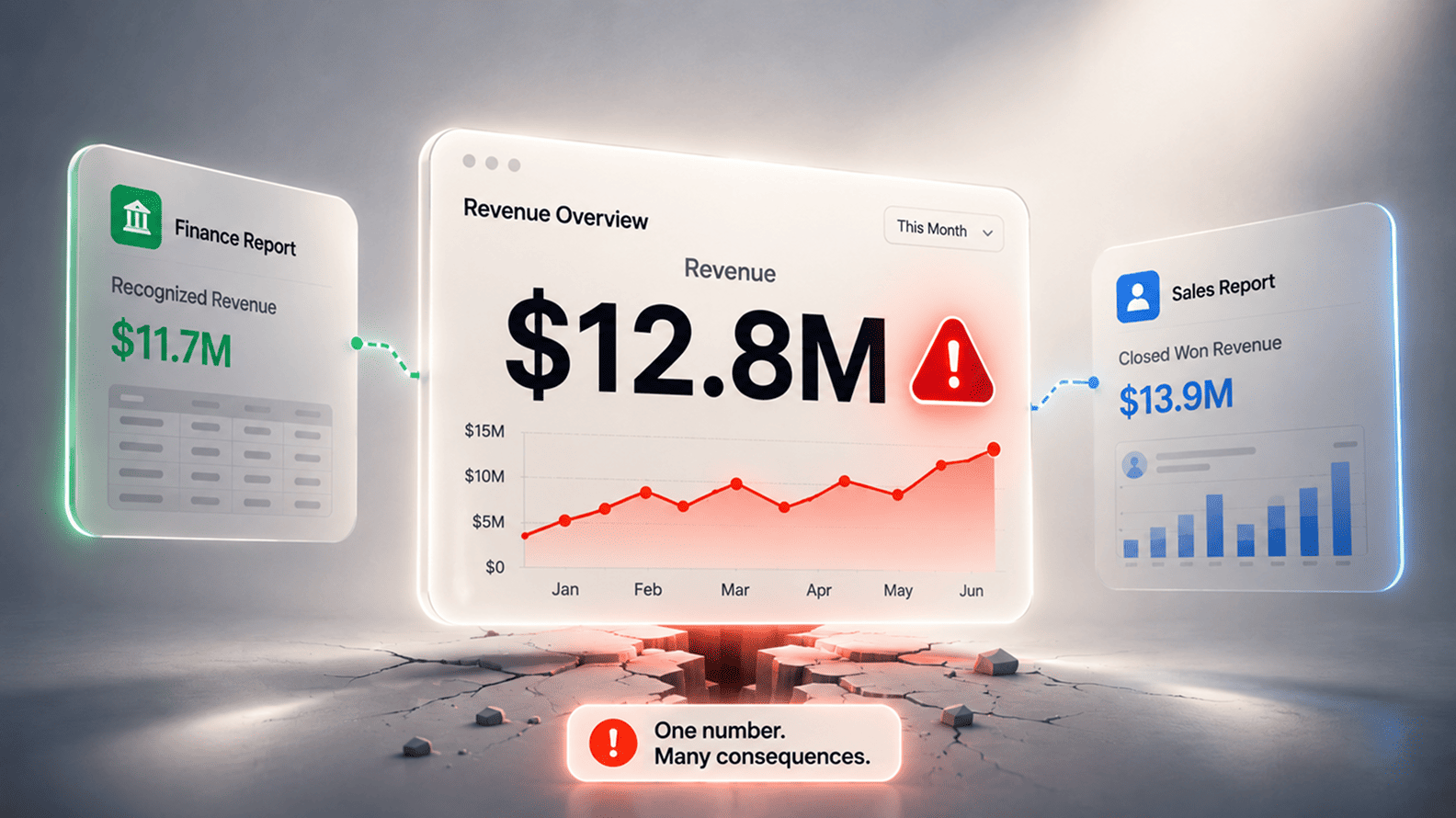
The cost of that weakness is not theoretical. Gartner has estimated that poor data quality costs organizations an average of $12.9 million every year. This figure is not only about broken dashboards as it also includes wasted analyst time, bad decisions, duplicated work, delayed reporting, operational errors, and the quiet loss of confidence that starts when two teams walk into the same meeting with different versions of the truth.
This is why buying a BI tool does not automatically create an analytics system. Power BI, Tableau, Looker, Qlik, and similar platforms can present data beautifully, but they cannot decide what revenue means, which system owns customer identity, whether a sales stage is being updated honestly, or whether marketing and finance are using the same definition of conversion.
Google Cloud’s explanation of Looker’s semantic layer makes the same point in more technical language: businesses need a place where they can define metrics once and use them everywhere if they want governance, security, and trust in data.
A dashboard is where people see the business while an analytics system is what makes that view reliable enough to act on. When companies confuse the two, they often end up redesigning reports, changing charts, or switching BI tools while the deeper problems remain untouched. The better question is not whether the dashboard looks clear. It is whether the business can trust the chain of data and decisions that produced it.
Salesforce’s acquisition of Tableau for $15.7 billion made one thing very clear: dashboards and business intelligence had become central to how companies wanted to work. Leaders wanted faster visibility, teams wanted self-service reporting, and every department wanted a cleaner way to read performance without waiting for a spreadsheet pack to arrive before the meeting.
The appetite was real, and the tools became stronger. Tableau, Power BI, Qlik, Looker, and similar platforms made it easier for business teams to connect data, create charts, build reports, share dashboards, and explore metrics without writing everything from scratch.
Tableau’s own product page describes the promise directly: users can connect to data from almost anywhere and create visual analysis through drag-and-drop. For many companies, that is a major upgrade from static reports, manual Excel files, and monthly MIS decks.
The trouble begins when the dashboard tool is treated as the analytics capability itself. A company can move from spreadsheets to a modern BI platform and still carry the same old problems into a better-looking interface. Sales may still define pipeline one way while finance reads bookings another way.
Marketing may still change campaign naming every month. Customer success may still capture churn reasons loosely. Operations may still depend on manual corrections before leadership reviews. The dashboard becomes sharper, but the business logic underneath remains scattered.
That distinction matters because BI tools are excellent at presentation and exploration, but they do not automatically settle the harder business questions. They do not decide which system owns customer identity, whether revenue should follow invoice date or close date, how to handle refunds, whether test accounts should be excluded, or which version of a metric is official. Those choices belong to the analytics system around the tool: the data owners, metric definitions, source rules, validation checks, and governed models that make reporting consistent.
Atlassian’s launch of its analytics product showed this clearly. The company did not only talk about dashboards; it introduced an Atlassian Data Lake as a single source of truth across software, business, and IT workflows, along with dashboard templates and connections to warehouses such as Snowflake, Amazon Redshift, and Google BigQuery. That framing is useful because it treats dashboards as part of a wider data layer, rather than the whole project.
A BI tool can make reporting faster and more usable. It can also expose confusion faster when the business has not agreed on the data behind the screen. The companies that get more value from dashboards usually do not start by asking how many charts they can build. They start by making sure the numbers have a stable home, a shared meaning, and a clear owner before those numbers reach the people expected to act on them.
Uber’s data-quality work is a useful reminder of how early analytics problems begin. The company wrote about building a consolidated data quality platform after realizing that bad data could quietly travel into critical datasets and downstream systems.
Its platform supported more than 2,000 critical datasets and detected about 90% of data-quality incidents, which tells us something important about scale: even companies with mature engineering teams do not assume source data will behave on its own.
For most businesses, the source layer is less glamorous than the dashboard, but it is where the truth begins to bend. A lead may start inside a website form, paid campaign, CRM, call log, or partner referral sheet. A revenue number may begin as a contract, invoice, payment record, credit note, or finance adjustment.
A product metric may begin as an event fired inside an app. A support metric may begin with a ticket category chosen by a human under time pressure. By the time those records reach a dashboard, they already carry the habits, shortcuts, and inconsistencies of the teams that created them.
This is why source systems should be read as business behavior, not just data feeds. If sales reps update deal stages only before review meetings, the pipeline dashboard will show performance theatre instead of pipeline reality. If marketing keeps changing campaign names across platforms, channel reporting becomes a cleanup exercise.
If customer success teams leave churn reasons vague, retention analysis loses the detail that would have helped the business intervene earlier. If finance keeps important adjustments outside the reporting flow, leadership dashboards may look complete while quietly missing the numbers leaders actually trust.
Netflix’s old engineering note on the evolution of its data pipeline makes the same point from a different angle. The company described growing demand for real-time analytics with sub-minute latency, but speed only matters when the events being captured are meaningful and consistent.
A faster pipeline can move a weak event faster. It cannot turn loosely captured activity into reliable business meaning after the fact. The first layer of an analytics system is the moment business activity becomes data. The quality of that moment decides how much trust the dashboard can carry later.
GitLab’s 2017 database incident is usually remembered as an outage story, but it is also a useful example of why data movement and recovery systems deserve more attention than they usually get. In its own postmortem, GitLab said an accidental removal of data from the primary database left GitLab.com unavailable for hours and caused the company to lose production database changes affecting roughly 5,000 projects, 5,000 comments, and 700 new user accounts.
The repositories themselves were not lost, but the incident showed how quickly a failure in the movement, replication, and recovery layer can become visible to users and painful for the business.
Analytics pipelines work with the same kind of quiet dependence. Data leaves Salesforce, HubSpot, Stripe, NetSuite, Shopify, Zendesk, Jira, product databases, or internal tools and travels toward a warehouse, lakehouse, reporting database, or BI model. Most business users never see that movement.
They only see the dashboard after the pipeline has finished its work, so they assume the numbers are current, complete, and ready to use. When a sync runs late, a schema changes, a job partially fails, or late-arriving records miss the reporting window, the dashboard can still load cleanly while the story inside it is incomplete.
This matters because a pipeline does not only carry data from one place to another. It carries time, rules, formats, assumptions, and failure risk. A daily revenue dashboard may be perfectly acceptable for a board review, but dangerous if sales managers treat it like a live view of bookings.
A support dashboard that refreshes every few minutes may be useful for queue management, but it may not match the final SLA report after ticket corrections and escalations are applied. The same company can have two accurate reports that disagree simply because they represent different moments in the life of the data.
Cloudflare’s 2020 outage offers a wider infrastructure parallel. A configuration change in one of its backbone systems caused traffic to be dropped across multiple cities, and Cloudflare later explained how the incident spread through the network before mitigation began.
The lesson for analytics is not that pipelines are the same as networks, but that invisible systems shape visible experience. When the transport layer has a problem, the front-end experience is the place where people feel it first. In analytics, that front end is usually the dashboard.
Strong dashboard teams therefore treat freshness, latency, and failure signals as part of the user experience. A report should not quietly pretend to be live when it is refreshed once a day, and a leadership dashboard should not bury the fact that one source failed to load. The trust problem often begins when the screen looks calm while the pipeline behind it is not.
When Spotify moved parts of its analytics stack from on-premises Hadoop to Google Cloud, the company was dealing with the kind of data history that modern digital businesses produce every second: listener behavior, playlists, recommendations, ads, creator activity, and product usage.
Its engineering team described how the migration to tools such as BigQuery helped Spotify support faster analysis at scale, which is exactly why storage matters in analytics. It is not a parking place for old data. It is where business activity becomes usable memory.
Most companies feel this need long before they call it a warehouse, lakehouse, or analytical storage layer. A CRM can show sales activity, a billing tool can show invoices, a support platform can show tickets, and a product database can show usage. But leadership questions rarely respect those boundaries.
The business wants to know which campaigns create customers who renew, which customer segments create the highest support burden, which product behaviours predict expansion, and which delivery teams protect margin. Those answers usually need history from several systems, joined carefully and read in context.
This is where a connected dashboard can create a false sense of integration. A report may pull data from five tools and still leave the company without a stable analytical foundation. The joins may live inside one dashboard. Corrections may happen in spreadsheets.
Definitions may change from one report to another. Historical comparisons may break when a source tool changes its structure. The company gets more charts, but the business still lacks one dependable place where its past can be combined, cleaned, and understood.
Snowflake’s explanation of a cloud data warehouse is useful here because it frames the warehouse as a place for consolidating data from multiple sources for analytics and reporting. That is the real shift. The dashboard shows the view, but the storage layer gives the view memory. Without that layer, every new report risks becoming another temporary window into disconnected systems.
Airbnb’s Minerva is a strong example of why the model layer matters. The company built Minerva because different teams were calculating the same metrics in different ways, which created inconsistency across dashboards, experiments, and analysis.
In Airbnb’s own explanation of metric consistency, Minerva’s product vision was to let teams define metrics once and use them everywhere, from dashboarding tools to experimentation systems and anomaly detection. That is the job of a serious data model: it turns scattered records into shared business meaning.
A raw order is not automatically revenue. A user event is not automatically an active customer. A closed deal is not automatically booked revenue. A support ticket is not automatically SLA performance. Each of these becomes a usable metric only after the business decides which records count, which dates matter, which exclusions apply, which systems win when data conflicts, and which relationships are safe to use. Without that modeling work, dashboards may display familiar words while quietly calculating them in different ways.
Shopify’s work on in-context analytics shows this from a product angle. When Shopify brought analytics into merchant workflows, its engineering team described the work behind the experience, including data modeling, instrumentation, and success metrics. The visible product experience mattered, but the analytical value came from deciding what events meant, how they should be measured, and how those measurements would help merchants act inside the flow of work.
This is where dashboard disagreements often become expensive. If revenue is joined to line items incorrectly, totals can multiply. If campaign touches are connected to opportunities without clear attribution logic, marketing influence can look stronger than it is. If active users are defined differently across product, finance, and leadership reports, the company may spend the meeting debating the metric instead of the business. The dashboard did not create that confusion. It only made the modeling gap visible.
A good data model gives the business a calmer reporting environment because the important choices have already been made before the chart appears. It gives users consistent concepts such as customer, lead, order, renewal, churn, margin, active user, and utilization, so every dashboard does not have to rebuild those ideas from scratch.
A large retailer can have one word, such as “customer,” moving through half a dozen systems before it appears in a dashboard. Ecommerce may treat a customer as someone who placed an online order. Loyalty may treat the same person as a member profile. Finance may care about billed accounts.
Store operations may group household purchases differently. AtScale describes this problem well in its semantic layer explanation, where terms such as “prospect,” “client,” and “counterpart” can be mapped into one standard business entity instead of forcing every dashboard to interpret them separately.
That is the quiet value of a semantic layer. It gives the business a shared language over data that may be technically complex underneath. Users do not need to know every table, join, system field, or warehouse structure before asking for revenue, churn, margin, customer lifetime value, active accounts, or inventory movement. The approved meaning of those terms sits in one governed layer and travels into dashboards, analyst workflows, and increasingly, AI-assisted analysis.
ThoughtSpot’s explanation of semantic layers is useful here because it connects the idea directly to business use. It defines the semantic layer as a business representation of data that helps people use the same language and definitions for key metrics.
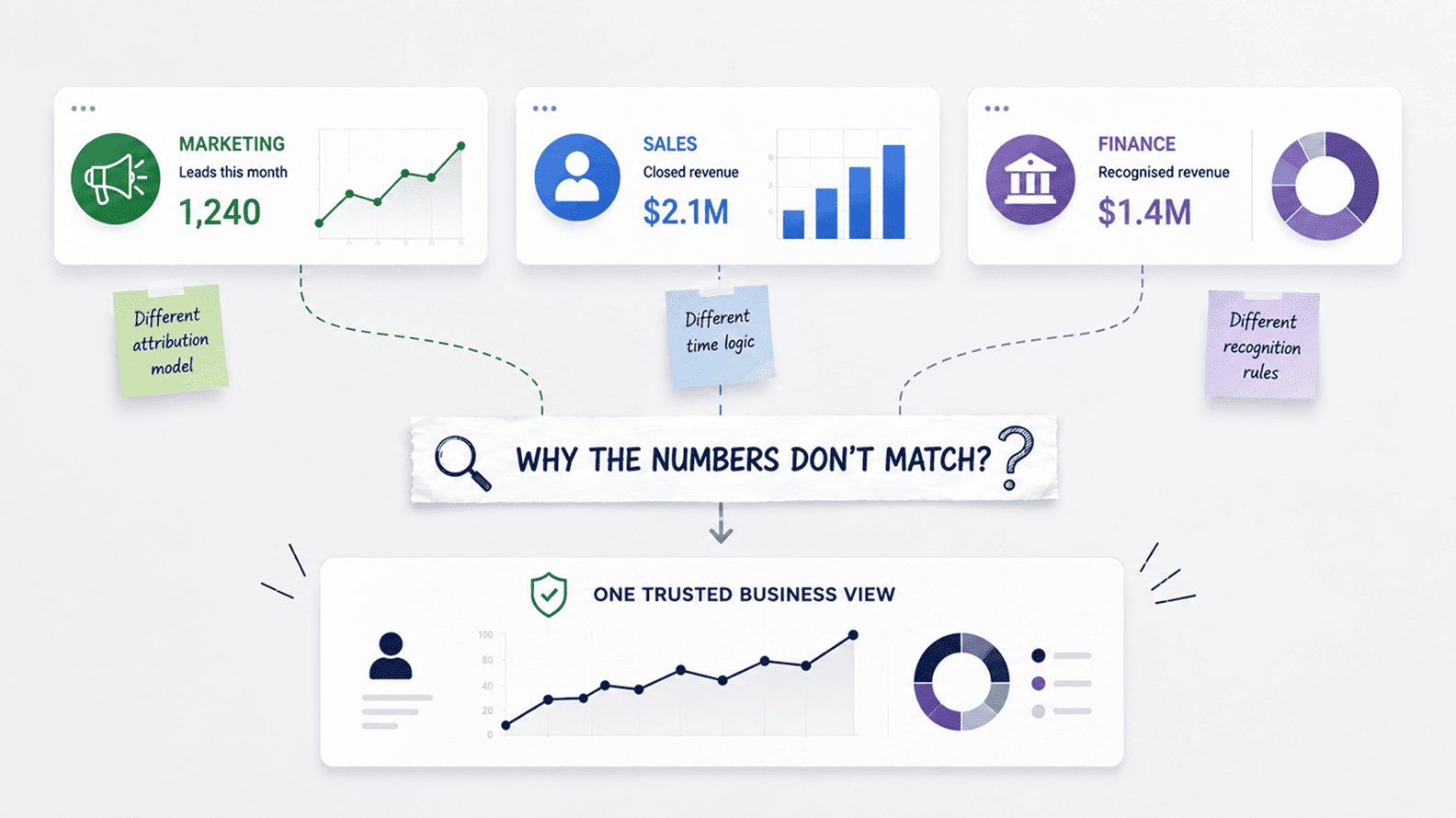
That is exactly where many dashboard disagreements begin. One team excludes refunds from revenue. Another includes them until the month-end closes. One team counts a customer after signup. Another counts only after the first paid invoice. One report removes internal test accounts. Another quietly keeps them in the total.
The semantic layer does not make those choices easy, but it gives them a home. Once the business has agreed on the definition, the logic does not have to be rebuilt inside every dashboard, SQL query, spreadsheet, or department report. That matters even more as analytics moves beyond dashboards into natural-language search and AI copilots. If the business has five definitions of the same metric, an AI interface will not magically know which one leadership trusts.
This is why the semantic layer is becoming more important than ever before. The more places a company consumes data, across dashboards, spreadsheets, notebooks, embedded analytics, and AI tools, the more dangerous it becomes to let each surface invent its own version of the truth.
UPS is a good example of what happens when analytics is tied to a real operating decision instead of being treated as a reporting display. Its ORION route-optimization system was built around the daily choices drivers and planners make on delivery routes, and BSR’s case study notes that UPS expected ORION to reduce annual mileage by 100 million miles and save 10 million gallons of fuel. The value did not come from showing more charts. It came from putting the right information into the flow of a decision that had cost, time, fuel, and service impact.
That is where dashboard design earns its place in the analytics system. A dashboard is the interface where people meet the data, so the design has to respect the decision being made. A sales manager reviewing forecast risk needs a different view from a CEO reviewing quarterly revenue movement.
A support lead watching live queues needs a different screen from an operations head reviewing monthly SLA performance. When every dashboard tries to serve every audience, it usually becomes a crowded page of half-useful numbers.
Qlik’s definition of an analytics dashboard as an interactive graphical interface for displaying, tracking, and analyzing KPIs and metrics captures the visible job well, but the better dashboards do more than display. They show users which period they are looking at, whether the data is fresh or final, which filters are active, where the number came from, what changed, and where to drill down without forcing people to leave the report and ask someone else for context.
The risk is that dashboard polish can create false confidence. A clean executive page with sharp charts and neat totals can still mislead if it hides uncertainty, mixes live and finalized numbers, or gives equal visual weight to metrics that do not drive the same decision. McKinsey’s guidance on design leadership metrics states that teams should choose metrics that matter to the business, not simply measure what is easy to show.
The best dashboards feel simple because the hard choices have already been made. They do not ask the user to decode the data system during a meeting. They help the user see what changed, understand why it may matter, and decide what needs attention next.
In its 2023 annual report, Inditex, the parent company of Zara, describes how systems such as RFID and its Integrated Stock Control System help it manage inventory across brands and make stock visible with much greater speed.
For a fashion retailer, visibility is not a dashboard achievement by itself. It affects store replenishment, online availability, markdown risk, production planning, and the speed with which teams respond to what customers are actually buying.
This is the final test of an analytics system: whether it changes what the business does next. A sales dashboard should help managers decide which deals need intervention, where forecast risk is building, and which reps need coaching. A marketing dashboard should help teams decide which campaigns deserve more budget and which channels are producing volume without quality.
A finance dashboard should help leaders understand cash movement, margin pressure, variance, and revenue risk. An operations dashboard should help teams spot capacity strain, backlog growth, and delivery bottlenecks before they become client-facing problems.
Maersk makes a similar point from the supply-chain side. Its discussion of big data in supply-chain optimization explains how analytics can improve production planning, inventory, customer experience, risk management, and cost control. Those are decision areas, not chart categories. The data has value because it helps people move stock, protect service levels, reduce waste, and respond earlier when the operating picture changes.
This is where many dashboard-heavy companies lose the plot. The report exists, the charts refresh, and the review meeting happens every week, but no one is quite clear what action the dashboard is meant to support. People discuss the movement, ask for another cut of the data, export a table, and then return to the same operating rhythm. The dashboard may be technically correct and visually clean, but it is not yet part of how the business changes course.
A useful dashboard has an obvious decision attached to it. If the number moves, someone knows who should care, what they should check, and what options are on the table. Without that connection, analytics becomes a record of what happened rather than a way to improve what happens next.
| Layer | What the business sees | What can go wrong if this layer is weak |
| Source system | A CRM deal, invoice, product event, support ticket, campaign record, employee log, or finance entry becomes the first version of business data. | The dashboard inherits missing fields, duplicate records, vague categories, poor naming, delayed updates, and human shortcuts from the systems where the data was first created. |
| Data pipeline | Records move from tools such as CRM, billing, product, marketing, finance, or support systems into an analytical destination. | Reports become stale, incomplete, delayed, or quietly wrong when syncs fail, schemas change, late records arrive, or transformations happen without visibility. |
| Analytics storage | Data lands in a warehouse, reporting database, or governed model where history from multiple systems can be combined. | Teams remain stuck with disconnected views. A campaign report, revenue report, support report, and customer report may all exist, but they cannot reliably answer cross-functional business questions. |
| Data model | Raw records become business concepts such as revenue, pipeline, churn, active users, margin, utilization, retention, and SLA performance. | Metrics drift because every dashboard or analyst rebuilds logic differently. Totals break, joins inflate numbers, dates are applied inconsistently, and teams argue over the same KPI. |
| Semantic layer | Approved business terms, definitions, relationships, permissions, and metric logic are made available across reporting tools. | Every dashboard starts inventing its own version of revenue, customer, churn, conversion, or active user, which damages trust even when the underlying data is available. |
| Dashboard | Users see KPIs, charts, filters, trends, comparisons, and drill-downs in a visual interface. | The report may look polished but still hide freshness, uncertainty, source differences, weak definitions, or context the user needs before acting. |
| Analyst interpretation | Someone explains why the number moved, what changed underneath it, and what the business should examine next. | Users see movement without understanding the cause. A spike, dip, or variance becomes a meeting discussion rather than a decision trigger. |
| Business decision | Leaders and teams use the insight to shift budget, coach reps, fix operations, adjust inventory, change pricing, improve product flows, or reduce risk. | Analytics becomes reporting theatre. The company has dashboards, meetings, and charts, but the operating rhythm does not change. |
Many companies buy the dashboard layer first because it feels like the fastest route to progress. The license is approved, the tool is rolled out, the first reports go live, and for a short period the business feels more modern. Then the old problems begin to reappear inside the new interface.
The sales number still does not match finance. Product usage still needs manual cleanup before leadership reviews. Marketing still exports campaign data because attribution is incomplete. The dashboard has changed, but the operating design behind reporting has not.
Thoughtworks makes a useful distinction in its note on data product thinking, where it argues that data consumers should be treated like customers who need discovery, understanding, trust, access, and consumption across the data value chain. That framing is useful because it moves the conversation away from “how do we build a report?” and towards “what kind of data experience does the business need in order to act without second-guessing the number?”
The same shift is visible in analytics engineering. dbt describes analytics engineers as people who provide clean data sets to end users by transforming, testing, deploying, and documenting data, not just by creating visual reports. That matters because most dashboard disappointment is not caused by weak chart design. It comes from skipped decisions about metric ownership, source reliability, transformation logic, validation, documentation, and which version of a report should be treated as official.
The design work feels slower at the start, which is why businesses often avoid it. It is more tempting to show a polished dashboard than to settle uncomfortable questions about who owns revenue logic, which CRM fields are mandatory, how refunds should be treated, when a month is final, or how old reports should be retired. But those unanswered questions do not disappear. They move into the dashboard and return later as disagreement, rework, and loss of trust.
A dashboard built before the analytics system is designed often becomes another surface for confusion. A dashboard built after the business has clarified sources, definitions, ownership, freshness, and decision use has a much better chance of becoming part of how the company actually works.
Small companies usually do not wake up one morning with a “data strategy” problem. The problem arrives in smaller, more familiar ways. The CRM says one thing, the billing tool says another, the campaign report lives in a spreadsheet, customer notes sit inside someone’s inbox, and the founder still trusts the manual sheet because it is the only place where the numbers have been corrected before a meeting.
IBM’s explanation of data silos as isolated collections of data that make sharing across departments and systems difficult is often discussed in enterprise language, but the pattern is just as common in a 40-person services firm or a growing ecommerce business.
The difference is that smaller businesses feel the damage more personally. One missed renewal reason can hide a customer-risk pattern. One loosely maintained CRM field can distort the sales forecast. One spreadsheet formula changed by hand can affect hiring, inventory, or cash planning. A company does not need a large data platform to suffer from weak analytics. It only needs enough tools, enough growth, and enough people using the same words differently.
A lighter analytics system can solve a lot before the business ever needs enterprise machinery. A small team may only need a shared KPI dictionary, a clear list of source-of-truth tools, basic naming rules, visible refresh dates, report ownership, and a monthly check where finance, sales, marketing, and operations agree which numbers are official. That may sound simple, but it is the difference between a dashboard people use and a dashboard people quietly verify in Excel before trusting it.
The need grows as the business grows. More campaigns create more attribution questions. More salespeople create more CRM variation. More customers create more billing exceptions. More tools create more places for definitions to drift. SAP’s guide to data silos describes them as disconnected pockets of business data across departments, processes, and platforms, and that is usually how small-company reporting breaks: not through one dramatic failure, but through many small separations that become normal.
For small and mid-sized businesses, the aim is not to copy an enterprise data stack. The aim is to build enough discipline so that the dashboard is not just a nicer screen for scattered information. Even a lightweight system can give the business something valuable: fewer arguments over basic numbers, faster reviews, cleaner handoffs between teams, and more confidence when leaders need to act before the month is over.
The dashboard-tool question usually arrives too early. A leadership team compares Power BI, Tableau, Looker, Qlik, or another platform because the visible problem is reporting. Meetings are slow, spreadsheets keep multiplying, and teams spend too much time preparing numbers before reviews. A new tool feels like the natural fix because it promises cleaner charts, faster access, and less dependency on manual reporting.
The better question comes before tool selection: what has to be true before the business trusts the number? If the answer is unclear, the company is likely to carry the same confusion into whichever dashboard platform it chooses. Databricks frames the modern lakehouse as a way to combine data warehousing and data lake capabilities so teams can support business intelligence, machine learning, and analytics from a common data foundation.
That foundation matters because dashboards are now only one place where business data gets consumed. The same metrics may feed executive reports, self-service analysis, alerts, embedded analytics, forecasting models, and AI assistants. If the foundation is weak, every consumption layer inherits the weakness.
This is also why metric trust has become an AI-readiness issue. As companies add copilots and natural-language interfaces to reporting, vague definitions become more dangerous. A human analyst may know that “active customer” has three possible meanings inside the company and ask a follow-up question. An automated interface may simply return an answer from whichever definition is easiest to access. The dashboard era already punished unclear metric logic. The AI era will expose it faster.
A useful dashboard is the visible part of a decision system. It shows the business what changed, but the confidence comes from everything underneath: source discipline, pipeline reliability, storage, modeling, semantic consistency, validation, ownership, interpretation, and action. Once those layers are stable, tool choice becomes important in the right way, as a question of usability, adoption, integration, and scale. Without them, the company is only choosing a better-looking place for the same argument to continue.
A dashboard is the visual reporting layer where users see KPIs, charts, tables, filters, comparisons, and trends. It helps teams monitor performance and understand what is happening across sales, marketing, finance, operations, customer support, product, or any other business function.
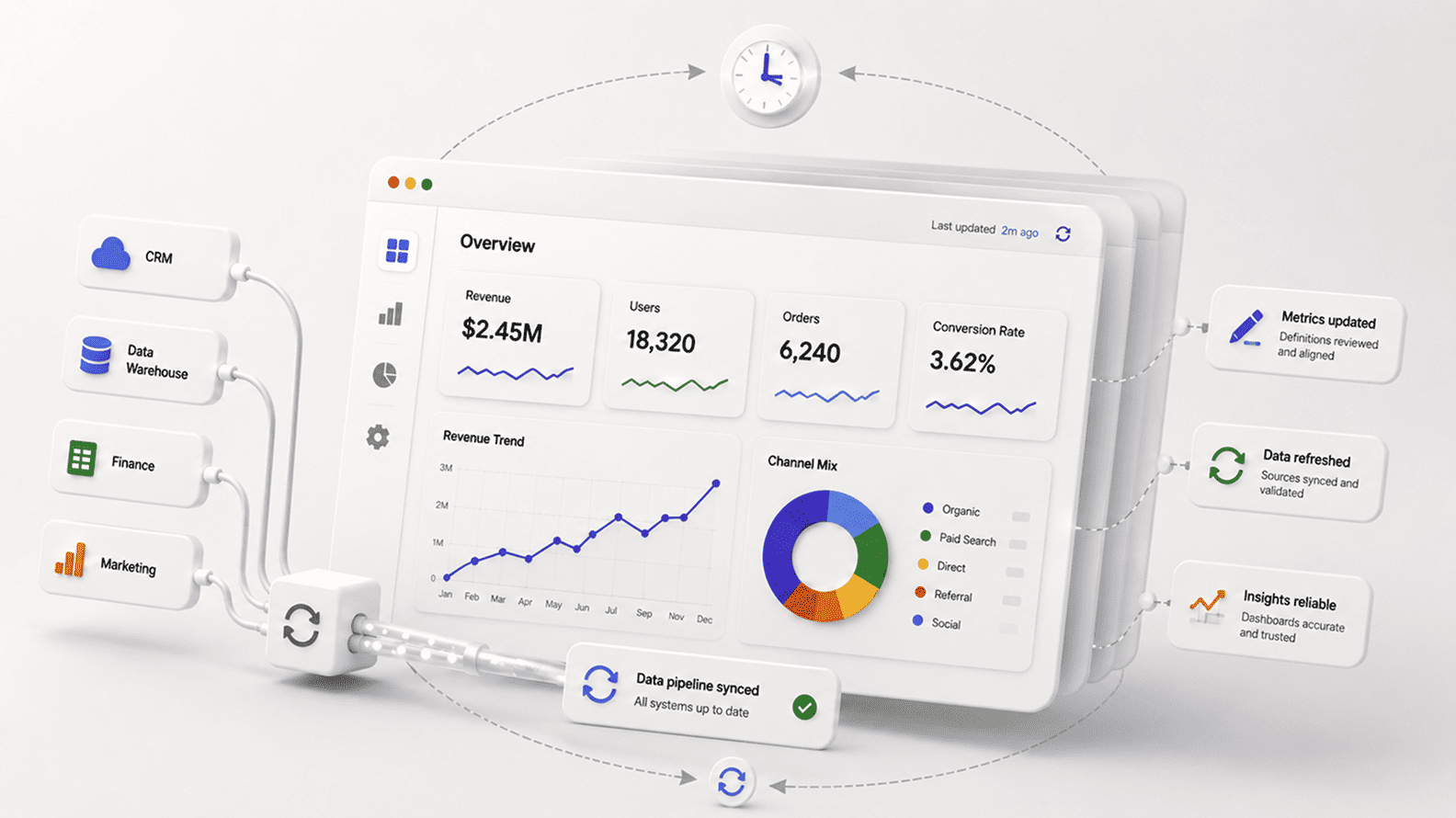
An analytics system is the larger chain behind that screen. It includes the source systems where data is first created, the pipelines that move it, the storage layer where it is combined, the models that define business meaning, the governance rules that protect consistency, and the interpretation that turns reporting into decisions. The dashboard is where people see the number. The analytics system is what makes the number reliable enough to use.
A BI tool can improve how reporting looks, how quickly users explore data, and how easily dashboards are shared. It does not automatically fix weak data capture, unclear metric ownership, inconsistent source systems, manual spreadsheet corrections, or teams using different definitions for the same KPI.
That is why companies can move from Excel-heavy reporting to a modern BI platform and still have the same arguments in leadership meetings. If finance calculates revenue one way, sales reads pipeline another way, and marketing uses a different conversion logic, the dashboard tool will only display those disagreements more neatly. The real improvement comes when the business fixes the definitions, source rules, validation, ownership, and models behind the reports.
A practical analytics system usually includes source systems, data pipelines, analytics storage, data models, semantic or metric layers, dashboards, analyst interpretation, and business decisions. AWS describes a data pipeline as a series of processing steps that prepare enterprise data for analysis, which captures one important layer of this chain.
The source system captures business activity. The pipeline moves and sometimes transforms it. The warehouse, lakehouse, or reporting database preserves and combines it. The model turns raw records into business concepts such as revenue, churn, utilization, active users, or margin. The dashboard displays the view. Analysts explain movement, and the business uses that understanding to act.
A data pipeline moves data from source systems into an analytical destination where it can be used for reporting, analysis, forecasting, or decision-making. In a real business, that may mean moving records from a CRM, billing platform, ecommerce store, support tool, finance system, or product database into a warehouse, lakehouse, or reporting model.
The pipeline matters because the dashboard depends on it. If the pipeline runs late, fails silently, drops records, duplicates data, or transforms fields incorrectly, users may still see a clean dashboard with incomplete numbers. Fivetran describes its platform as moving critical business data from more than 700 sources into destinations such as warehouses and lakes, which shows how central data movement has become to modern analytics.
Analytics storage is the place where business data is kept, combined, and prepared for analysis. It may be a data warehouse, lakehouse, reporting database, or another governed analytical layer. Oracle describes a data warehouse as a system designed to support BI, querying, and analysis, often using historical data from many different sources.
This matters because source tools are built for operations, not every analytical question. A CRM manages deals, a billing system manages invoices, a support tool manages tickets, and a product database runs the application. Analytics often needs to connect all of them. Without a reliable storage layer, dashboards may stay trapped inside individual tools and fail to answer cross-functional questions such as which customers renew, which segments create support load, or which campaigns lead to profitable revenue.
A data model turns raw records into business concepts. It defines how tables relate, which fields should be used, what one row represents, how measures are calculated, and how important terms such as customer, revenue, lead, churn, active user, utilization, or margin should be understood.
This layer matters because raw data rarely speaks in business language on its own. An invoice is not automatically recognized as revenue in every context. A signup is not always a customer. A product event is not always an active user. A data model makes those decisions explicit so dashboards do not keep rebuilding the same logic differently.
A semantic layer is a governed business layer that sits between raw data and the tools people use to consume it. It defines approved metrics, dimensions, relationships, permissions, and business terms so teams can use the same logic across dashboards, spreadsheets, embedded analytics, and AI-assisted analysis.
Informatica describes data governance as the principles, standards, and practices that help ensure data is reliable, consistent, and trustworthy. A semantic layer supports that goal at the metric level. Without it, every team may define revenue, churn, conversion, or active customer in its own way. With it, the business has a central place where approved logic can live and travel into different reporting surfaces.
Dashboards usually fail because the data system behind them is weak. The tool may work perfectly, but the source data may be incomplete, the pipeline may be stale, the model may use unsafe joins, the metric definitions may be unclear, or no one may know which report is official.
This is why dashboard complaints often sound like design problems but behave like trust problems. Users say the dashboard is wrong, slow, confusing, or incomplete, but the deeper issue may sit in CRM discipline, billing reconciliation, event tracking, data freshness, or business ownership. A polished dashboard cannot create trust if the number behind it has not been properly defined and validated.
A business has a dashboard when users can see numbers. It has an analytics system when users can trust, explain, and act on those numbers without rebuilding them before every important meeting.
The signs are easy to spot. If teams still export data to Excel before reviews, argue over which report is correct, ask whether the dashboard has refreshed, or maintain private versions of the same metric, the company probably has dashboards without a strong analytics system. If users know where the data comes from, which metrics are approved, when the data was refreshed, and who owns the number, the system is becoming more mature.
Before building more dashboards, companies should fix the questions that affect trust. They should know which decisions the dashboard supports, which metrics matter, which source system owns each metric, how the metric is defined, how often the data refreshes, who validates it, and who is responsible when users find a mismatch.
Monte Carlo’s pipeline observability documentation explains how monitoring can detect unusual update patterns, size changes, growth changes, and stoppages in data flow. That kind of visibility matters because dashboards should not quietly depend on broken or stale pipelines. More dashboards rarely solve the problem if the business has not fixed source quality, pipeline reliability, metric logic, ownership, and interpretation first.
Aug 04, 2026 / 27 min read
Aug 04, 2026 / 22 min read
Jul 31, 2026 / 24 min read